Naoto Yamada Bass player
Contact

Tab & score editor for bands · Mac & Windows

Linert (formerly Lowline): tab & score editor for bands

Guitar and bass, all in one song.

Write your parts, hear them together, and share them as PDF or video. Lowline for bass and Highline for guitar, now in one tab & score editor for bands.

Buy now (¥2,980 each, before tax) Try it in your browser In the web demo, pick guitar or bass, write up to 8 bars of tab and hear it with real sound.

Chord window: type a chord name and pick a shape to drop in the tab and the chord name

Already using Lowline?

The update to Linert 2.0 is free.

Lowline is now Linert. Linert 2.0 is a major update to Lowline, at no extra cost. Your songs, settings and license carry over, so you can keep writing bass parts exactly as before.

  • On a Mac, it arrives as an automatic update and the app's name changes from Lowline to Linert
  • On Windows, it arrives through the Microsoft Store
  • Your existing .btab songs still open as they are
  • You only need a Highline license to edit guitar parts. You can still open and listen to them without one

Why Linert

Built for writing guitar and bass parts

Most tab software is packed with features for orchestral and full-band scores — far more than you need when all you want is to put one part on paper.

Linert grew out of writing out dozens of original songs. It doesn't just strip things away — it's loaded with every “I wish it could do this” feature we could think of.

However many guitars you stack, every part shares the same barlines. Play them all together and switch parts from the top bar as you write.

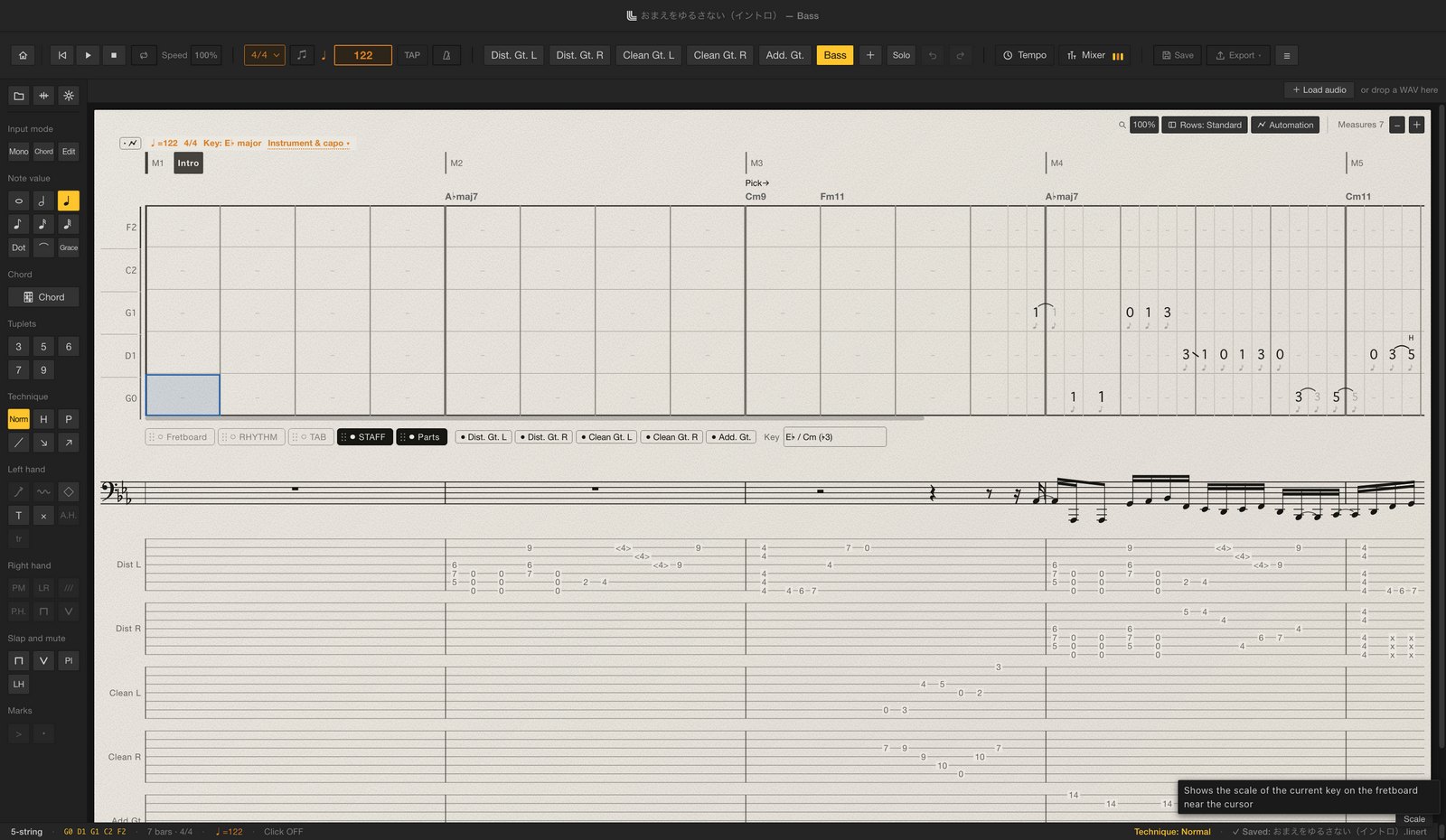
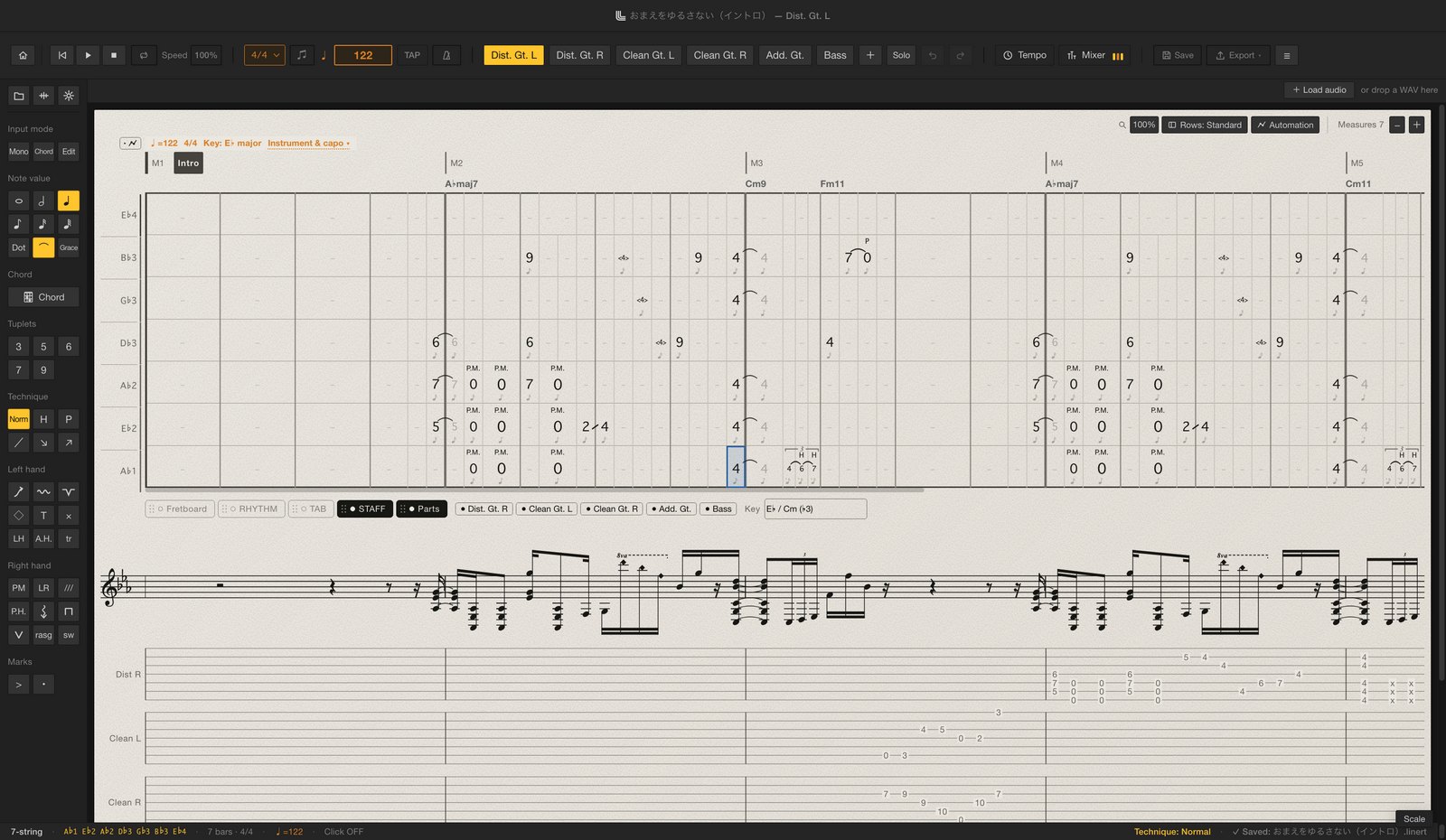
The editor with the bass part selected. Five guitar parts and a bass part in the top bar, a 5-string bass tab in the center, with standard notation in bass clef and slim tab strips of the other parts below. The Linert editor. Five guitar parts and a bass part in the top bar, a 7-string guitar tab in the center, with standard notation and slim tab strips of the other parts below.
Five guitars and a bass (intro of “Unforgivable” by été, a demo song included in the app)

Instruments

One license per instrument.

There's one app, and your licenses decide which parts you can edit. Start with either one and add the other any time. Parts without a license can still be opened, viewed and played. Beatline for drums is coming soon.

Chords and strumming that feel like guitar

  • 6 to 8 strings, alternate tunings
  • Capo, partial capo
  • Bends, vibrato, whammy bar
  • Palm mute, let ring
  • Natural, artificial & pinch harmonics
  • Strums, rasgueado
  • Tremolo picking, trills, sweeps
  • Chord window, chord diagrams
  • Clean / Crunch / Dist

Type a chord name and pick a voicing to drop the tab and the chord name in together. Voicings follow your current tuning and capo.

Basslines, written the way you play them

  • 4- to 7-string bass
  • Slap, ghost notes
  • Slides, glisses
  • Hammer-ons, pull-offs
  • Tapping, harmonics
  • Grace notes, left-hand hits
  • Clean / Dist

The editor a bassist built for writing basslines, carried over as it was. Fingerstyle and slap both play back with samples recorded from a real bass.

Coming soon

Drums, in the same song

  • Drum notation entry
  • Playback with recorded drum samples
  • Drum score PDF and video
  • Beat presets, your own samples

You'll be able to add a drum part to the same song as your guitar and bass. It's a separate license from Lowline and Highline, and it isn't on sale yet.

Editor

A light, simple, completely new editor.

The editor was redesigned from scratch to feel simple and lightweight. Many shortcuts match Guitar Pro 8, so you'll feel at home if you're switching.
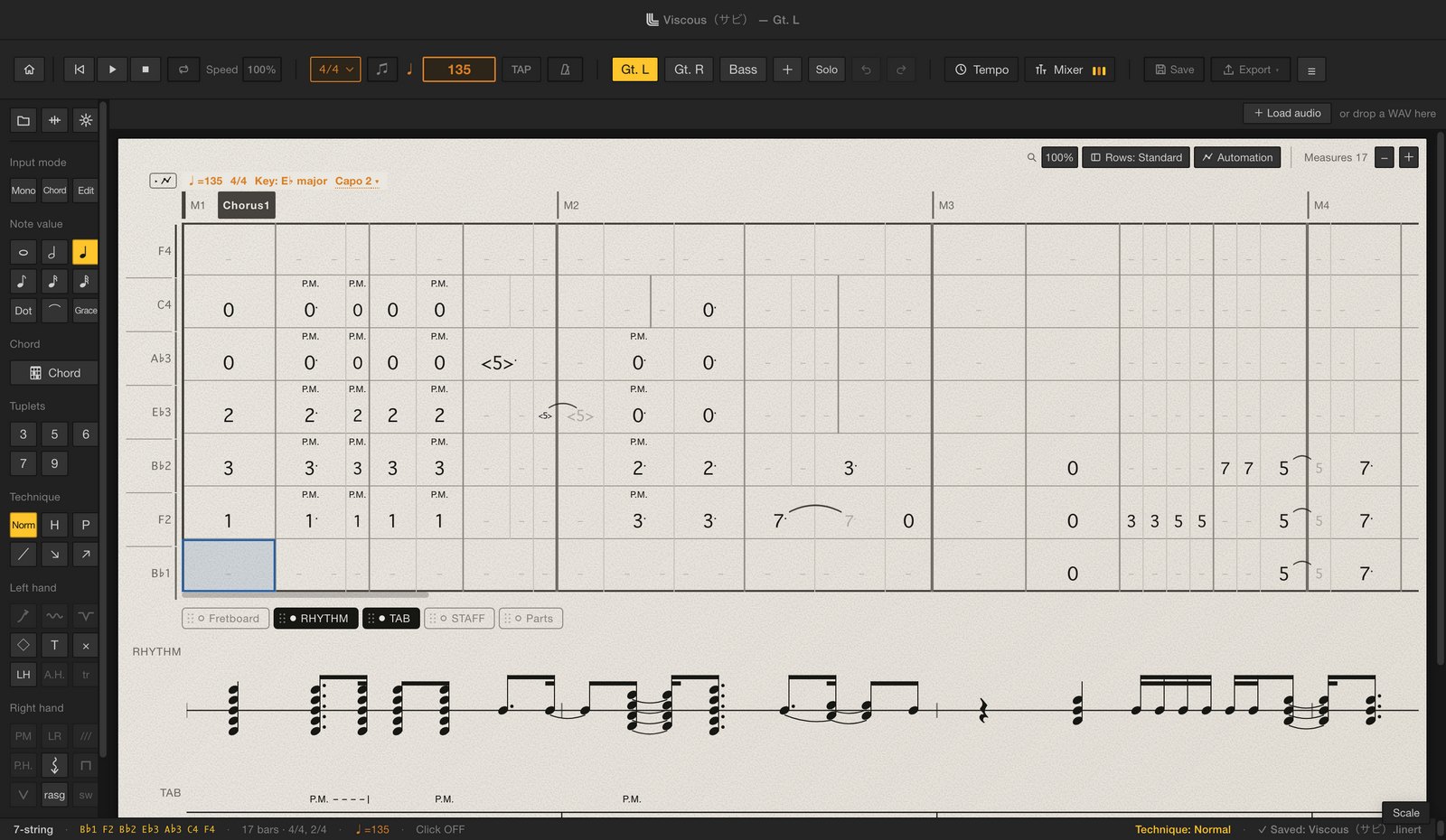
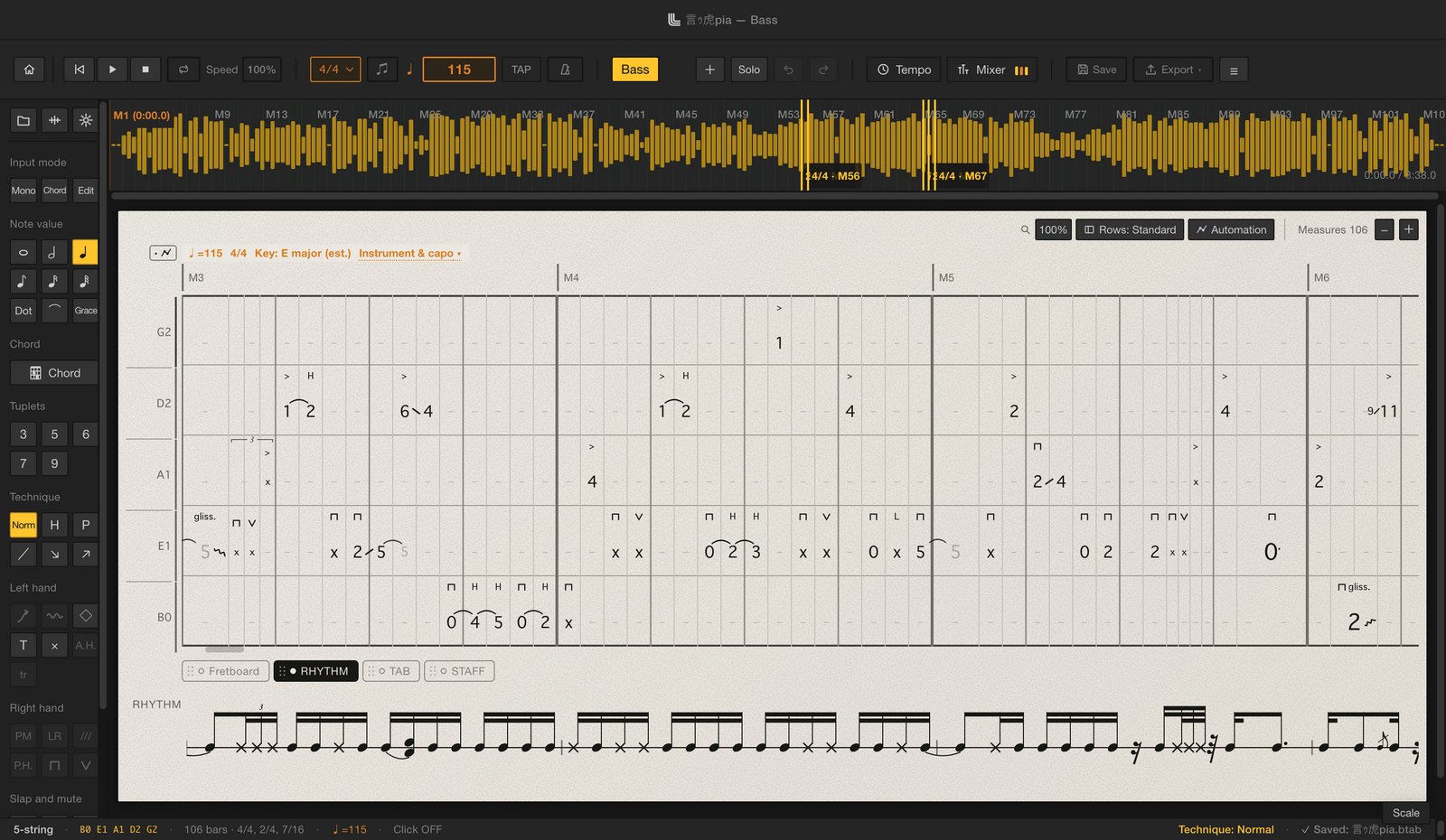
  • Odd time signatures
  • Tempo changes
  • 3-, 5-, 6-, 7- & 9-tuplets, ties, dots
  • Chord names & sections
  • Repeats, voltas, D.S., coda
  • Automatic rhythm & standard notation
  • Fretboard view, scale guide
  • Other parts shown as slim tab strips
A guitar part. A 7-string guitar tab with palm-mute (P.M.) and other marks in the center, and rhythm notation below. A bass part. The song waveform on top, a 5-string bass tab with slap and other technique marks in the center, and rhythm notation below.
A guitar part (the chorus of “Viscous” by été, a demo song included in the app)A bass part (“言ゥ虎pia” by été, a demo song included in the app)

Features

From writing it down to sharing it.

01

Auto-draft from your stems

Import the stem of your recorded bass or guitar and Linert drafts the tab for you.
No more starting from a blank page.

* Accuracy depends on the recording (a clean, effect-free signal works best) and on how demanding the playing is.

* WAV files only (MP3 and other formats are not supported).

02

Tab video for your playthroughs

Export a video of your tab moving across the screen. Key out the background, lay it over your playing footage, and your social posts go up a level.

Have it scroll, turn pages every few bars, or show the current shape as a big chord diagram. Pick both the score and chord diagram looks to export two videos in one go. Choose a green screen, blue screen, black, white or any custom background. For Shorts and Reels, lay it across your vertical video as a strip.

  • 16:9
  • 1920×1080
  • 30fps
03

Library & autosave

The library puts every score you've written one click away. Linert keeps a backup every time you edit, so if you close without saving, you can pick up where you left off.

Songs are saved as named .linert files in your library folder, and open with a double-click in the Finder or File Explorer. Each song remembers all its parts, mixer settings and audio file location.

04

Punchy playback with real samples

Playback uses samples recorded from a real bass and a real guitar. Set level, pan and tone for each part in the mixer, and add filter, chorus, delay and reverb. You can even switch tones during playback.

  • Clean
  • Crunch
  • Dist
  • Slap

Also

  • PDF export typeset with a music font (single parts, all parts, full score)
  • Import Guitar Pro (.gp), MusicXML and MIDI — coming from Guitar Pro?
  • Export Guitar Pro (.gp) and MusicXML
  • Play along with the song's audio (levels are matched automatically)
  • Metronome, and practice playback from 50 to 100% speed without changing pitch
  • Automation for tempo, pan and effects
  • Automatic chord names from your notes or the song's audio
  • Copy & paste, insert and delete measures, save phrases
  • Three demo songs included (言ゥ虎pia, the intro of “Unforgivable” and the chorus of “Viscous”, all by été)
  • A tutorial of about two minutes
  • Japanese / English interface

Practice

Write it, then play it and get a score.

Tightline scores your playing against the tab, right after you play. Open it from inside Linert and practice the song you're writing.

No ads

Tightline inside Linert shows no ads, so nothing gets between you and your next take.

Score your own tabs, full song

It opens on the current part of the song you have open. Get scored from start to finish in one take, or just work on the bars you need.

See exactly which notes were off

Get scores for timing, pitch, note endings and evenness. Click a note in the tab to see how many ms it was off.
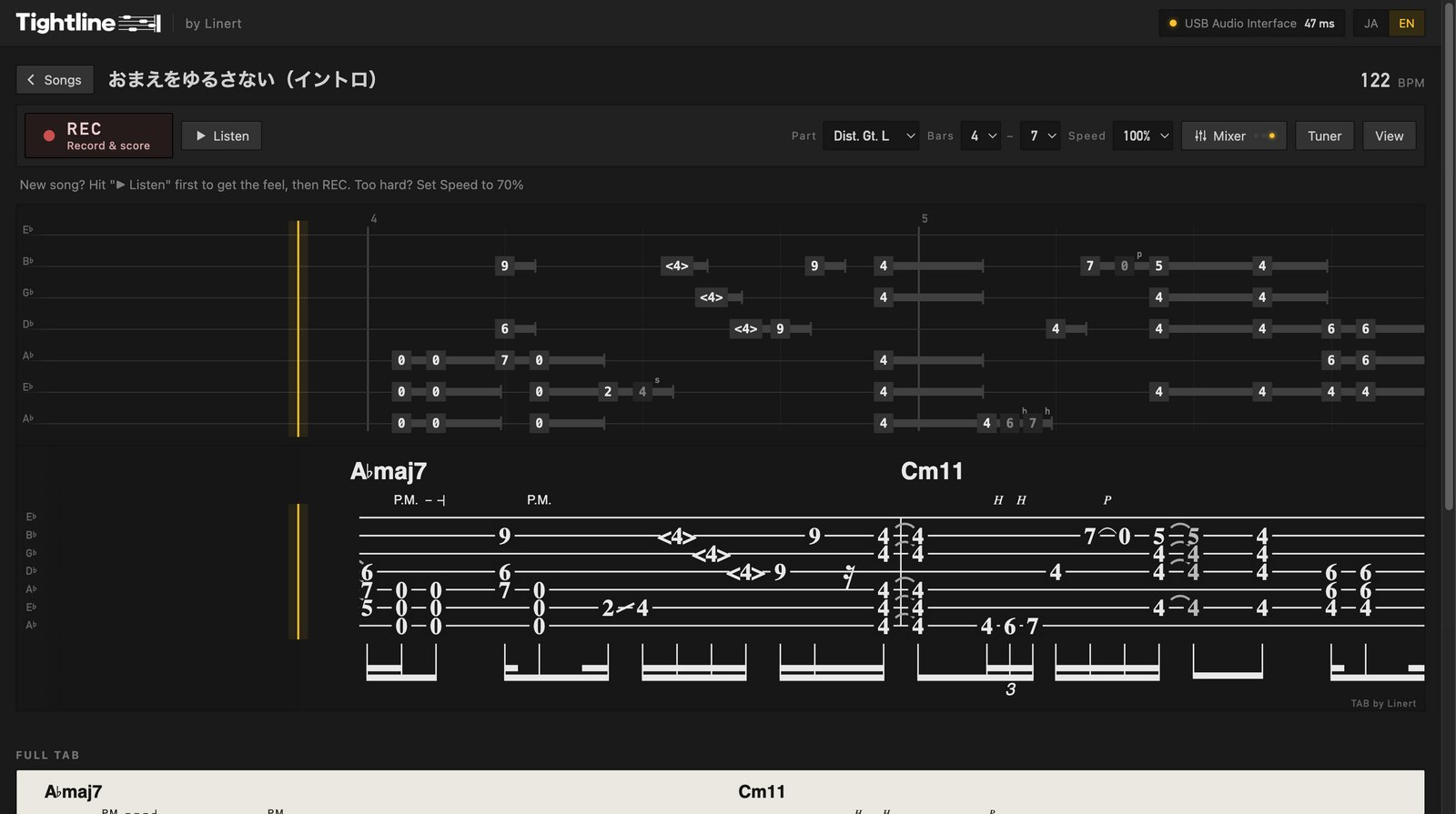
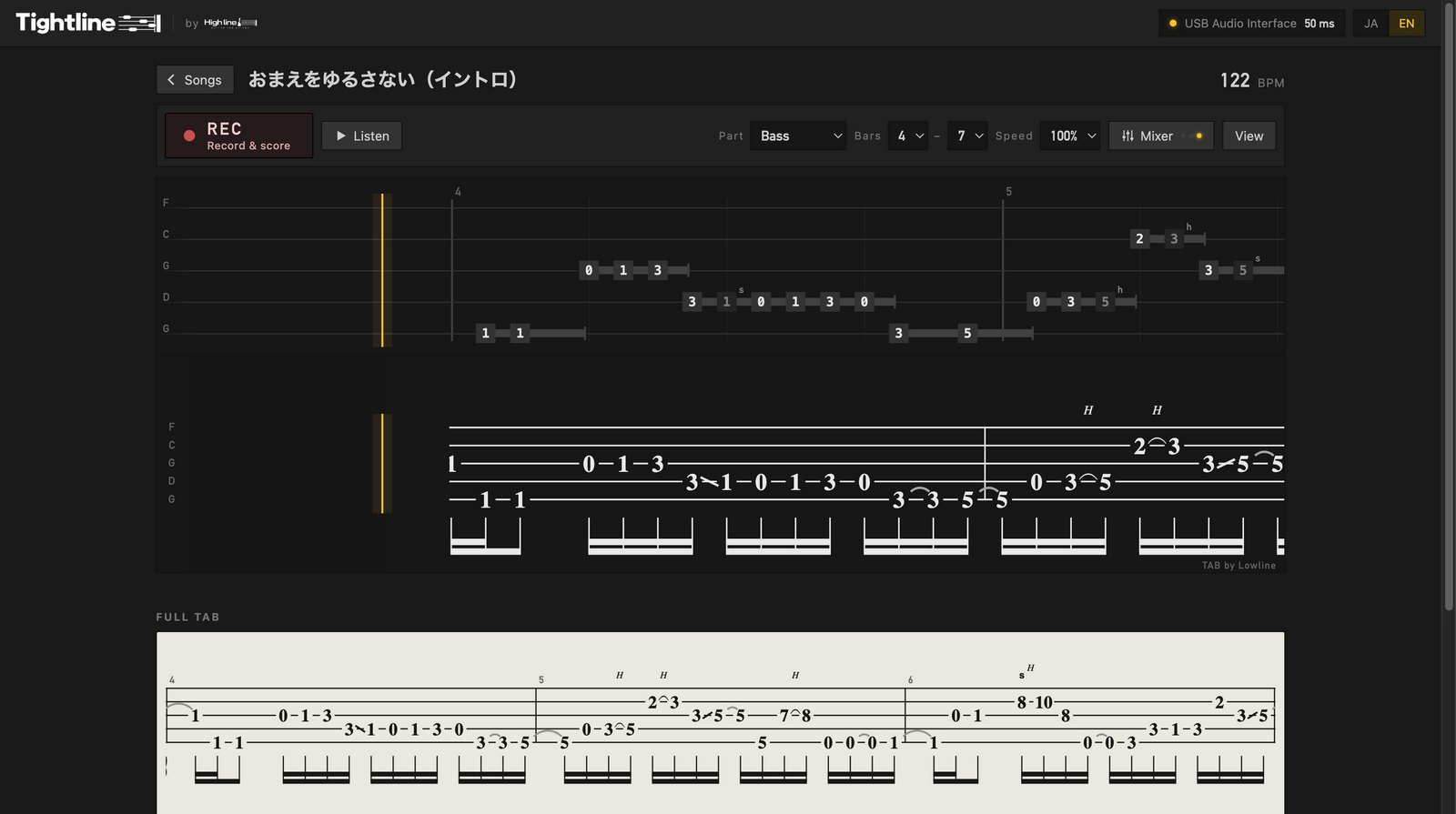
Tightline opened on a guitar part (Dist. Gt. L) of the “Unforgivable” intro. REC and guide buttons, part, bar and speed controls on top, with the full tab below. Tightline opened from Linert, playing the bass part of the “Unforgivable” intro. REC and guide buttons, part, bar and speed controls on top, with the full tab below.
Tightline opened from Linert. Pick a part of your song, hit REC and play
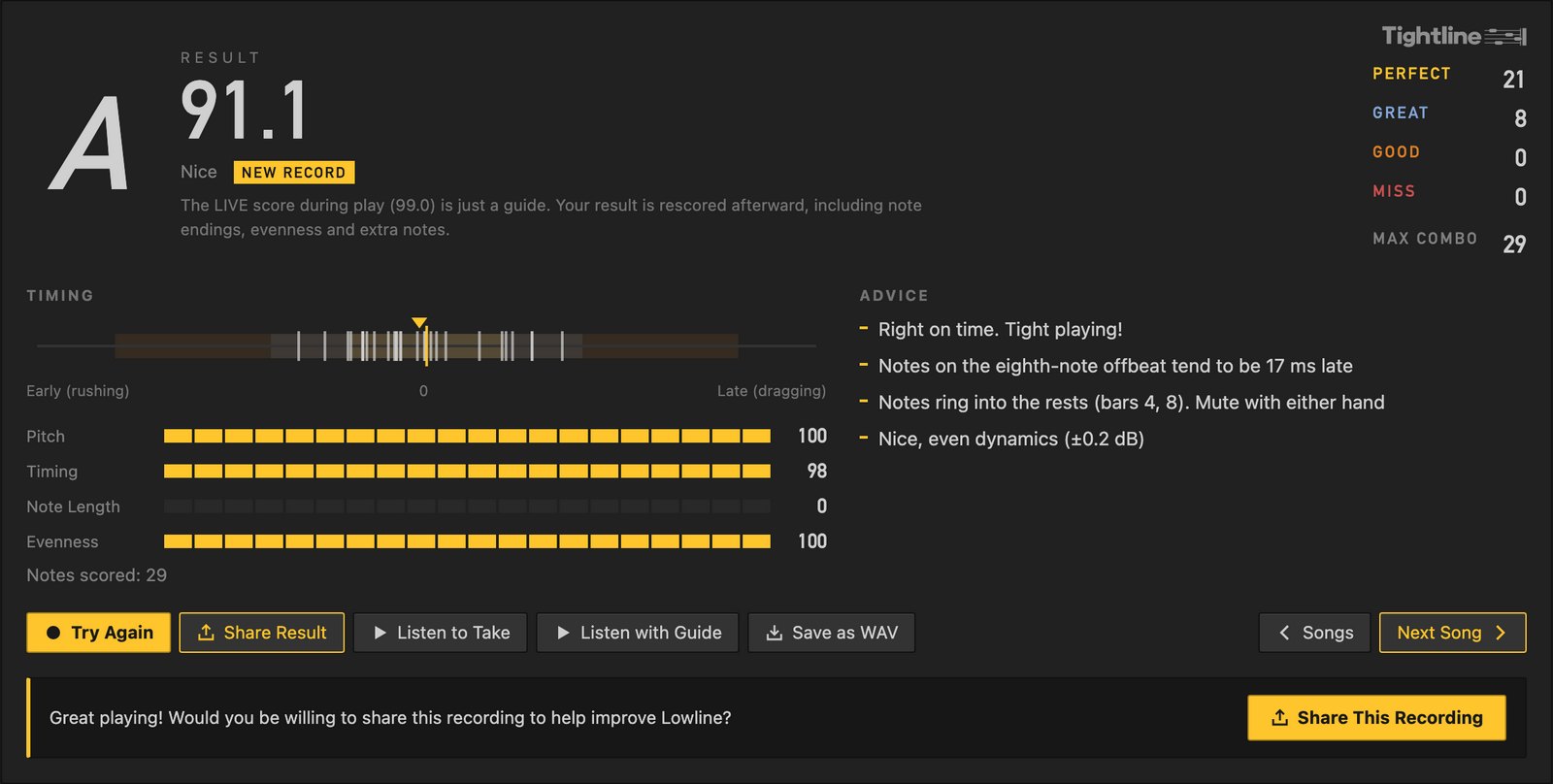
The result panel: rank A at 88.3 points, counts for each judgment, a timing bar, scores for pitch, timing, note endings and evenness, and short advice.
Your score appears as soon as you finish, along with whether you're rushing or dragging
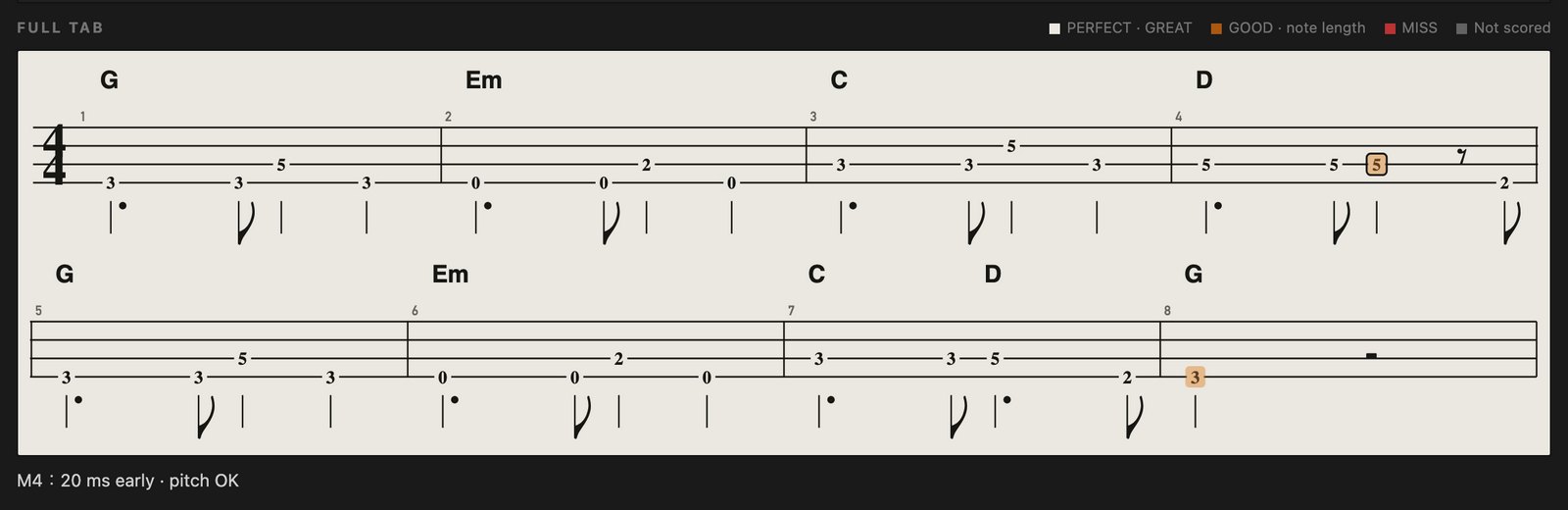
The full tab with each note color-coded by judgment. The selected note reads “M4: 59ms late, pitch OK”.
Every note in the tab is color-coded. Click one to see its timing in ms

Open Tightline on the web (free)

A tab & score editor for bands —
like no other, made for guitarists and bassists.

Availability

Availability

Highline

Edit guitar parts

¥2,980 (before tax)

Buy Highline
Lowline

Edit bass parts

¥2,980 (before tax)

Buy Lowline

Bass (Lowline) and guitar (Highline) are available now. Drums (Beatline) are coming soon as a separate license.

To edit both instruments, add both licenses. If you already own Lowline, the update to Linert 2.0 is free.

User guide

Linert user guide

From installing to writing and exporting, explained with screenshots and short videos.
Take a look before you buy.

Price
¥2,980 (before tax) each for Lowline and Highline. One-time purchase — not a subscription
Requires
Mac (macOS 13 Ventura or later, Intel / Apple silicon) and Windows (Windows 10 / 11). Not available for iPad
Devices
2 computers per license (Mac and Windows can be mixed)
Refunds
Full refund within 30 days of purchase, no questions asked
Contact
lowline.ba@gmail.com

Get the Windows app (Microsoft Store)

From purchase to first launch

  1. Complete your purchase
  2. Your license key arrives by email
  3. Install the app — on a Mac from the download link in the email, on Windows from the Microsoft Store (free)
  4. Launch the app and enter your license key

FAQ

I already own Lowline. Do I have to pay?
No. The update to Linert 2.0 is free, and your current license keeps working for bass parts. If you want to edit guitar parts too, add Highline.
Which one should I buy?
Pick the instrument you want to write: Highline for guitar, Lowline for bass. You can add the other any time, and until then you can still open, view and play those parts.
Can I write drums?
Beatline for drums is coming soon. For now you can buy bass (Lowline) and guitar (Highline) only, and Beatline will be a separate license (it's not included in Lowline or Highline). The drum screens you may see in our videos are from Beatline, too. We'll announce the release date and price on this page.
Can it open Guitar Pro files?
Yes, .gp files from Guitar Pro 7 and 8. Guitar and bass tracks are imported. You can also export to .gp and MusicXML (anything that doesn't carry over directly is converted to the closest match, and Linert tells you).
Do I need an internet connection?
Only when you enter your license key. After that, Linert works offline.
What if I get a new computer?
Deactivate your current computer in the app's settings (this removes both Lowline and Highline from it), then use the same key on the new one. Switching between Mac and Windows works the same way.
Can I import MP3 files?
Only WAV files can be imported. Export MP3s and other formats to WAV from your DAW first.
Does it run on Windows or iPad?
Windows, yes — get it free from the Microsoft Store and activate it with the same license key as the Mac version. iPad isn't supported.
Can I try it before buying?
Yes — in the web demo you can pick guitar or bass, write up to 8 bars of tab, play it back and get scored in Tightline. Saving and exporting (PDF / video) are in the full version. Open it in a browser on a computer. You can also get a full refund within 30 days of purchase.
Where can I learn how to use it?
A tutorial of about two minutes walks you through everything from entering notes to exporting, right on screen. You can replay it any time from the ≡ menu, and the ? key shows every shortcut. For the details, see the user guide below.

User guide (Mac / Windows) →