Blog
A Guitar Pro alternative for bass
An honest comparison from the bassist who built one
- How Guitar Pro 8 and Lowline compare for writing bass tab
- What a bass-only editor does differently
- When Guitar Pro is still the better choice, and free options
Guitar Pro is the standard for tab. If you play guitar and bass, or write parts for the whole band, it's hard to beat.
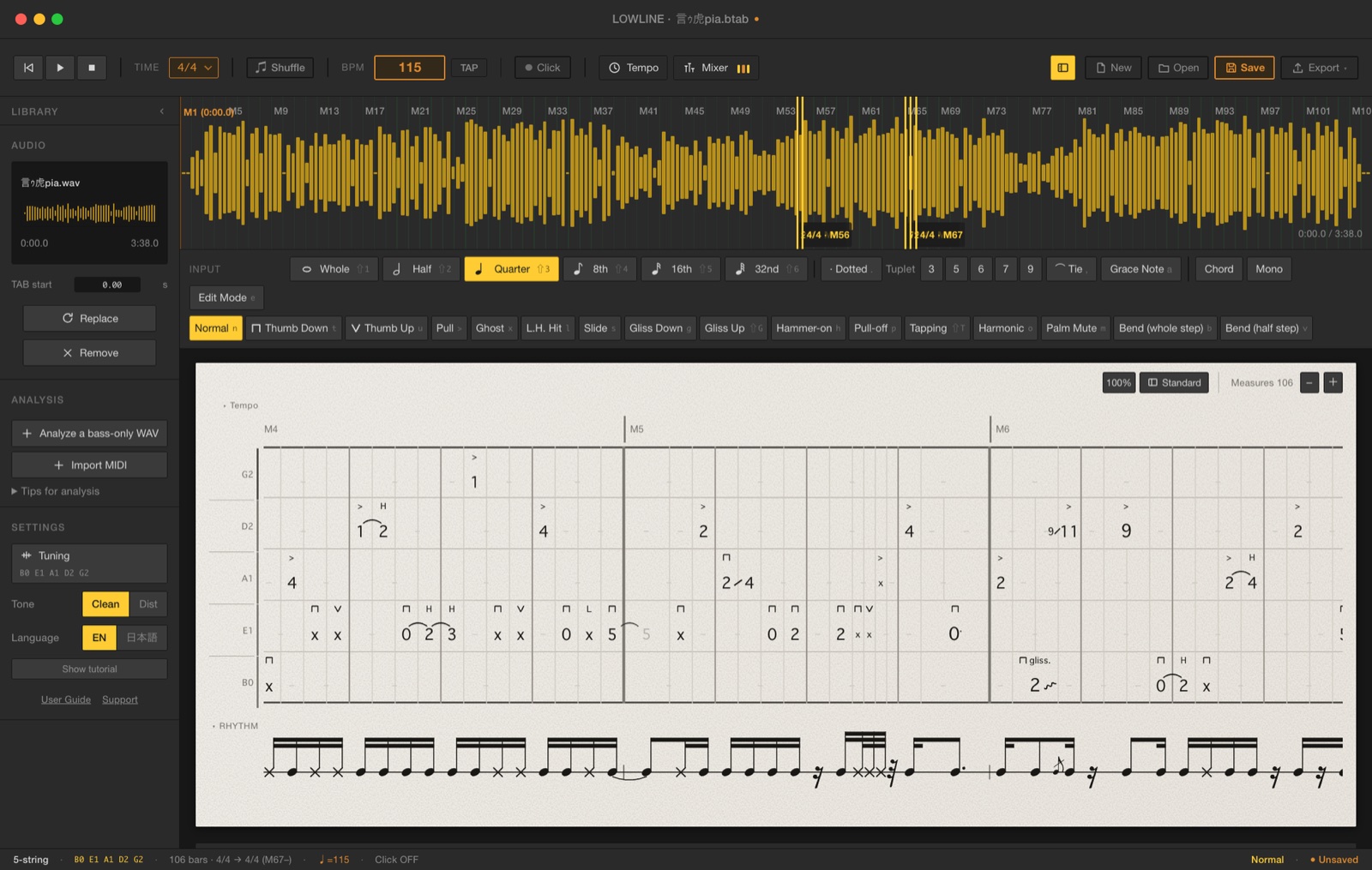
But if all you write is basslines, you're paying for, and scrolling past, a lot you'll never touch. That's why I built Lowline, a tab editor made only for bass.
Full disclosure: I'm Naoto Yamada, bassist in the Japanese band été, and Lowline is my app. So I'll be upfront about where Guitar Pro is the better pick, too.
01
The short answer
Go with Guitar Pro 8 if you
- write for guitar, drums, keys and other instruments too
- play an 8-, 9- or 10-string bass (Lowline handles 4 to 7 strings)
- need MIDI, MusicXML or audio exports to take parts into a DAW
- want to work on a phone or tablet as well
Go with Lowline if you
- only write bass
- want playback that sounds like an actual bass, in a clean or distorted tone
- post playthroughs and want a scrolling tab video to lay over your footage
- would rather start from a draft of your own recording than a blank page
And if you'd rather not pay anything, MuseScore Studio and TuxGuitar are free.
02
Guitar Pro 8 vs. Lowline, side by side
| Guitar Pro 8 | Lowline | |
|---|---|---|
| Price | $69.95, one-time (upgrade $34.95) | ¥2,980 before tax (about US$20), one-time |
| Runs on | Windows, macOS, plus iOS and Android apps | Windows 10/11, macOS 13 or later (no iPad) |
| Instruments | Guitar, bass, drums, keys and 100+ more | Bass only |
| Bass strings | 3 to 10 | 4 to 7 |
| Playback | Realistic Sound Engine (RSE), with bass presets | Samples of a real bass (fingerstyle, slap, ghost notes, harmonics) in Clean and Dist, switchable mid-playback |
| The song's audio | Import an audio track as a backing track | Load the song (WAV) and play along. Levels are matched automatically |
| Draft tab from a recording | Not listed | Yes, from a clean, bass-only WAV. It's a draft you fix by ear |
| Scrolling tab video | Not listed | Yes: 1920×1080 MP4 with a green, blue, black, white or custom background |
| Exports | PDF, MIDI, MusicXML, audio (MP3, WAV, FLAC…), Guitar Pro files and more | PDF, MP4 video |
| Opens | Guitar Pro files (.gp3 to .gp), PowerTab, MIDI, MusicXML, TablEdit and more | Guitar Pro 7/8 (.gp), MusicXML, MIDI |
| Try before you buy | 7-day free trial | Browser demo, plus a full refund within 30 days |
Guitar Pro details are from guitar-pro.com as of October 2026. “Not listed” means I couldn't find it among the features on the official site.
03
What a bass-only editor does differently
Playback that sounds like a bass
Every note you write plays back with samples recorded from a real bass: fingerstyle, slap, ghost notes and harmonics, in a Clean tone and a distorted one. You can switch between them while it plays.
Writing heavy music and hearing it back in a polite clean tone is just depressing. That alone was reason enough to build it.
Written the way bassists play
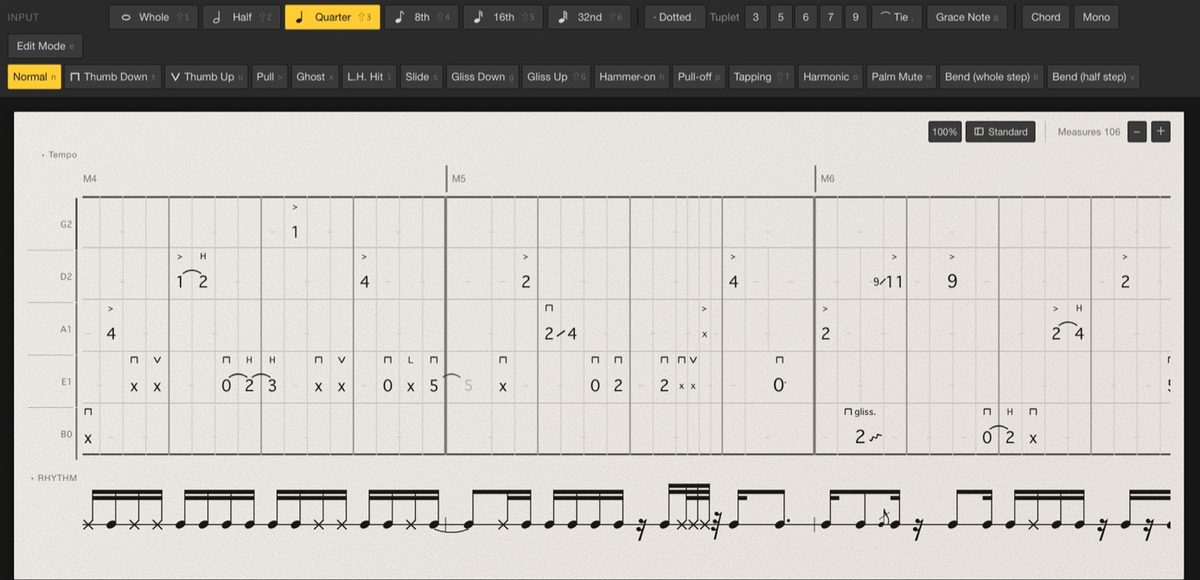
Thumb down and thumb up for slap, pull, ghost notes, left-hand hits, slides, glisses, hammer-ons, pull-offs, tapping, harmonics, palm muting and bends all sit in one row, each with its own key. Odd time signatures, tempo changes, grace notes, and 3-, 5-, 6-, 7- and 9-tuplets are all there, and the rhythm notation under the tab draws itself.
Tab videos for your playthroughs
Export a video of your tab scrolling across the screen, key out the background, and lay it under your playing footage. Put the song's audio in the export, and your video editor can line the two up by waveform on its own.
Syncing tab to a playthrough by hand used to take me about 15 minutes a video. Now the editor does it for me.
The export is 16:9 only. For Shorts and Reels, scale it down and run it across your vertical video as a strip.
A first draft from your own recording
Load a WAV of just your bass, clean with no effects, and Lowline drafts the tab for you. It won't be perfect, especially on busy parts, so treat it as a head start you finish by ear, not a finished transcription. It doesn't pull the bass out of a full mix.
Play along with the song
Load the song (WAV) and your tab plays in time with it, so you can hear how your line sits in the track. The levels are matched automatically, so you're not riding faders before every listen.
04
When to stick with Guitar Pro
Lowline does one thing. If any of these matter to you, Guitar Pro is the better tool.
- You write for the whole band. Guitar Pro puts guitar, drums, keys and much more in one file
- You play an 8-, 9- or 10-string bass. Lowline stops at 7
- You take parts into a DAW. Guitar Pro exports MIDI, MusicXML and audio. Lowline exports PDF and video only
- You want it on your phone or tablet. Guitar Pro has iOS and Android apps. Lowline is desktop only
- You want ready-made tabs. Guitar Pro's mySongBook has several thousand professional scores
You don't have to pick just one, though. Lowline opens Guitar Pro 7 and 8 files (.gp), so you can bring a bass part over and keep working on it there.
05
If you don't want to pay anything
Two free, open-source programs are worth a try. Both run on Windows, Mac and Linux.
- MuseScore Studio: full notation software that also handles tab. A good fit if you read standard notation too
- TuxGuitar: a lightweight tab editor in the spirit of Guitar Pro
FAQ
FAQ
- Is Lowline a subscription?
- No. It's a one-time purchase of ¥2,980 (before tax). One license covers two computers, and you can mix Mac and Windows.
- Can it open my Guitar Pro files?
- Yes, .gp files from Guitar Pro 7 and 8. Older .gp5 and .gpx files don't open directly. Export them as MusicXML first.
- Can I load MP3s?
- WAV only. Export MP3s and other formats to WAV from your DAW first.
- Does it work offline?
- Yes. You only need a connection when you enter your license key.
- Can I try it before buying?
- Yes. The browser demo plays the tab of “言ゥ虎pia” by été (one chorus) with real sound, and lets you try the tones and the mixer. Writing and exporting are in the full version. You can also get a full refund within 30 days of purchase, no questions asked.
- Is the app in English?
- Yes. It starts in English, and you can switch to Japanese in the settings.
Hear it for yourself
Lowline is a tab editor for Mac and Windows, made only for bass. It's ¥2,980 (before tax), one-time.
The quickest way to judge it is to hear it. The browser demo runs on a computer, no install needed.