Blog
Guitar tab from audio: how close can it get?
I measured it on real recordings, and here's what I found
- How accurate a guitar transcription draft really is
- Which recordings work well, and which don't
- How to fix a draft quickly
"Turn any song into guitar tab" is a promise you see everywhere now. I build a feature like this myself, so let me be straight about it: it won't give you a finished tab. You'll always need your ears to finish the job.
It's still worth it if it saves you most of the typing. I used to transcribe by flipping back and forth between the recording and my tab software. Since I could start from a draft of my own recording, writing out a tab takes me less than half the time.
In this post I'll share what I measured with Linert (formerly Lowline), the tab & score editor I make. Full disclosure: it's my app, so there's some self-promotion in here.
01
How accurate is it?
I tested it on recordings where I know the right answer: I played parts exactly as written in the tab, ran the recordings through the analysis, and compared the draft with the original tab.
| Recordings | Notes matched | Same string and fret |
|---|---|---|
| 21 real guitar-only recordings (used while tuning the settings) | 73.6% | 84% |
| 21 more real guitar-only recordings (not used for tuning) | 66.4% | 80% |
What the columns mean:
- Notes matched combines how many of the notes I played were found, and how many of the notes it found were right. On the first row, it found 69% of what I played, and 79% of what it found was correct
- Same string and fret is, among notes with the right pitch, how many landed on the same string and fret I wrote
The first row was measured after tuning the settings on those same recordings. For a recording it has never heard, the second row, 66.4%, is the more realistic number.
Single-note lines come out fairly well. Chords are still the weak spot, especially big chords and palm-muted chugs, where notes tend to go missing. Dense recordings, like guitar stems from a full band mix, come out much worse.
02
Why guitar is hard to transcribe
Chords
Bass is mostly one note at a time. Guitar can ring six strings at once, and all their overtones overlap, which makes it hard to tell which notes were actually played.
Distortion
Distortion adds even more overtones, so the notes are harder to pick apart.
Double-tracking
Band stems often have the same part tracked twice, or heavy effects on it. Recordings like that make the draft much less accurate.
The same note in several places
On guitar, the same pitch can be played in several places on the neck. A recording only tells you the pitch, so the string and fret are a guess at what's comfortable to play.
03
Two kinds of tools
| Services that work from full songs | Guitar-only recordings, inside a tab editor | |
|---|---|---|
| Examples | Klangio's Guitar2Tabs, Songscription | Linert |
| What you give it | Audio files, YouTube links and more | A guitar-only WAV |
| Good for | Getting a rough idea of a song you don't have the parts for | Turning your own playing into tab you can keep editing |
| Watch out for | Their own sites say you'll need to fix things | It can't pull the guitar out of a full mix |
I checked both services' official pages on November 8, 2026. Guitar2Tabs lets you try the first 20 seconds without signing up and exports .gp, MusicXML, MIDI and PDF. Songscription says it can separate the guitar from a full band recording, and works in standard tuning only. Its FAQ also says to expect to fix the odd fret position.
If you want to figure out a song you don't have, those services are the quicker start. Linert is built for turning your own recordings into tab. I haven't measured those services the same way, so please don't compare their accuracy with my numbers above.
04
How to record for the best draft
- Record clean. A DI signal straight from the guitar works best. Save the distortion and big ambience for the take you publish
- One guitar per file. If a recording has different guitars on the left and right, Linert only listens to the louder side. If you want both, export each one as its own WAV
- Export as WAV. Linert only loads WAV files
- Set the tempo and time signature first. Otherwise notes land in the wrong place
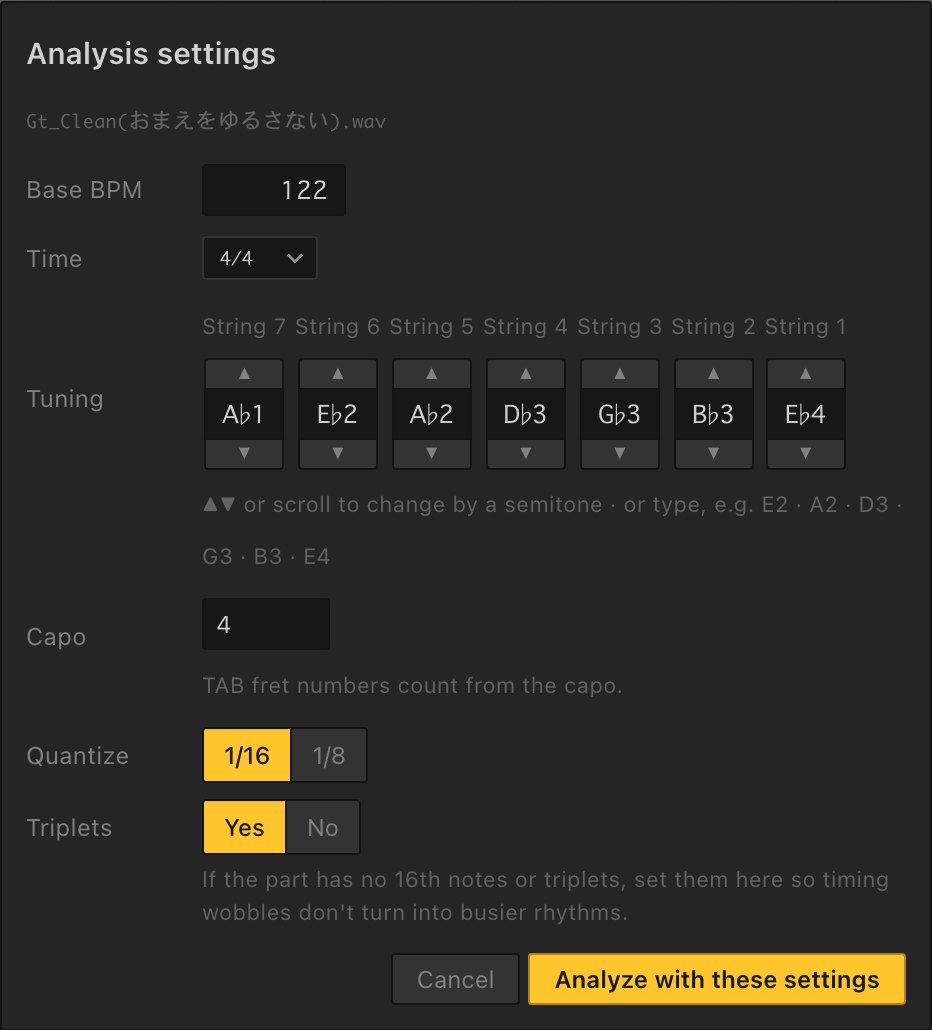
- Turn off what the part doesn't use. If there are no 16th notes or triplets, set Quantize to 1/8 and Triplets to No, so small timing wobbles don't turn into busy rhythms
05
In Linert, step by step
Editing guitar parts takes a Highline license.
- Open your guitar part and open the left panel with the Audio and settings button above the notation palette
- Under Stem to transcribe, click Transcribe a guitar-only WAV and choose your file (or drag the WAV onto the song screen and choose Guitar-only stem — transcribe it)
- In Analysis settings, match Base BPM, Time and Tuning to the recording
- Click Analyze with these settings, then Place on TAB when it's done
The analysis runs on your computer, so your recording isn't uploaded anywhere, and it works offline. Under the hood it uses Basic Pitch, a pitch-detection model published by Spotify.
06
Fixing the draft quickly
Going in a set order makes it much faster.
- Play it against the recording. Load the same WAV as a backing track and listen to both. The levels are matched automatically
- Loop the bars that sound wrong. Select them and press ⌘L (Ctrl+L on Windows)
- Add the missing chord notes. This is the most common mistake. Turn on chord input (⇧E) and stack notes on other strings
- Fix octaves. If a note is the right pitch class but sounds off, move it with ⌥↑ / ⌥↓
- Fix the fingering. ⇧↑ / ⇧↓ moves a note to another string at the same pitch. To fix a passage, select it, right-click and use Position to move it around the open, 3rd, 5th, 7th, 9th or 12th fret
- Add techniques last. Bends, palm muting and slides go in by hand
FAQ
FAQ
- Can it make tab from a YouTube video?
- Not in Linert. It needs a guitar-only WAV. For YouTube links, try one of the services in section 3.
- Does it work with distorted guitar?
- Yes, but it misses more. Use a clean DI if you can.
- Does it handle 7-string and drop tunings?
- Yes, once you set the tuning. Low chugs are the hardest part, though, and some notes will be missed.
- Will it get more accurate?
- I keep measuring and improving it, but I can't promise how far or by when.
- Can it pull the guitar out of a full song?
- Not at the moment.
- Can I try it first?
- You can try writing and playback in the browser demo (guitar or bass, up to 8 bars). Drafting from a recording is in the full version, and you can get a full refund within 30 days of purchase, no questions asked.
Start from a draft, not a blank page
Even when it isn't perfect, a draft beats starting from nothing. Try it on one of your own recordings.
More from this blog: How to make a guitar tab video · Bass tab from audio