Blog
Bass tab symbols explained
Slap, pop, ghost notes, slides and more, with examples
- How to read bass tab in 30 seconds
- A cheat sheet of the symbols you'll run into, with examples
- Slap tab, ghost notes vs. dead notes, and the one thing tab doesn't tell you
Bass tab is easy to start reading and surprisingly easy to misread. The numbers are simple. It's the little letters and marks around them (h, p, x, T, P, parentheses) that trip people up, especially since different tabs don't always agree on what they mean.
I'm Naoto Yamada, bassist in the Japanese band été. I've written out the bass parts for dozens of our songs, and I built a bass tab editor, Lowline, to do it. Here's the cheat sheet I wish I'd had, including the spots where tabs disagree.
All the examples below are short exercises I wrote for this post, mostly on a 4-string bass in standard tuning. Each one has a player under it, so you can hear how it sounds. The sound is Lowline's playback, recorded from a real bass.
01
Bass tab in 30 seconds
G|----------------|
D|----------2--4--|
A|----2--4--------|
E|-0--------------|
- Each line is a string. The top line is the highest-pitched string (G), and the bottom line is the lowest (E). Many beginners expect it the other way around
- Numbers are frets. 0 means the open string
- Read left to right. The example above plays open E, then frets 2 and 4 on the A string, then frets 2 and 4 on the D string
- Numbers stacked on top of each other are played at the same time
- The letters on the left are the tuning. Check them first. In drop D, for example, the bottom line reads D instead of E
A 5-string tab adds a low B line at the bottom, and a 6-string adds a high C line at the top:
G|---------------|
D|---------------|
A|---------------|
E|-------0---3---|
B|-0---5---------|
02
The cheat sheet
These are the symbols you'll see most in plain-text bass tab. Printed tab (from a book, or from software like Guitar Pro or Lowline) often uses the same letters above the staff instead of in between the numbers.
| Symbol | Means | Example |
|---|---|---|
| h | Hammer-on: pluck the first note, then fret the second without plucking again | 5h7 |
| p | Pull-off: pluck the first note, then pull your finger off the string to sound the lower one | 7p5 |
| / \ | Slide up / slide down: keep pressing and slide to the next fret | 5/7 7\5 |
| s | Slide, with the direction shown by the numbers | 5s7 |
| x | Dead (muted) note: a percussive click with no clear pitch. Also used for ghost notes (see below) | x |
| ( ) | Ghost note: a real note, played very softly | (5) |
| T | Slap with the thumb. Some tabs write S | T above the note |
| P | Pop: hook the string with a finger and let it snap against the frets. Not to be confused with a lowercase p (pull-off) | P above the note |
| t | Tap: fret the note with a finger of your plucking hand. Some tabs use T or +, so check the legend | t12 |
| < > | Natural harmonic: touch the string lightly right over the fret, without pressing | <12> |
| ~ | Vibrato | 7~~~ |
| b | Bend: push the string until it reaches the pitch of the second number | 7b9 |
| PM | Palm mute: rest the side of your plucking hand on the strings near the bridge. Also written P.M. | PM above the notes |
| gliss. | Glissando: a slide from or to no particular fret, often into or out of a note. Often drawn as a wavy line | \5 5\ |
Here's a short line that uses a few of them:
G|------------------------|
D|---------5h7---7p5------|
A|---3/5-------------5----|
E|-3--------------------x-|
Open with the 3rd fret on E, slide from 3 to 5 on the A string, hammer on from 5 to 7 on D, pull off from 7 to 5, land on the 5th fret of A, and finish with a muted click on E.
03
Reading slap tab: T, P and double thumb
Slap tab adds a row of letters above the strings: T for the thumb and P for the pop. A classic octave pattern looks like this:
   T   P   T   T P
G|-------------------|
D|-----2---------2---|
A|-------------------|
E|-0-------0---x-----|
Thumb the open E, pop the 2nd fret on D (an octave up), and so on. The x under a T is a muted thumb slap: just the click, no note.
Thumb down and thumb up
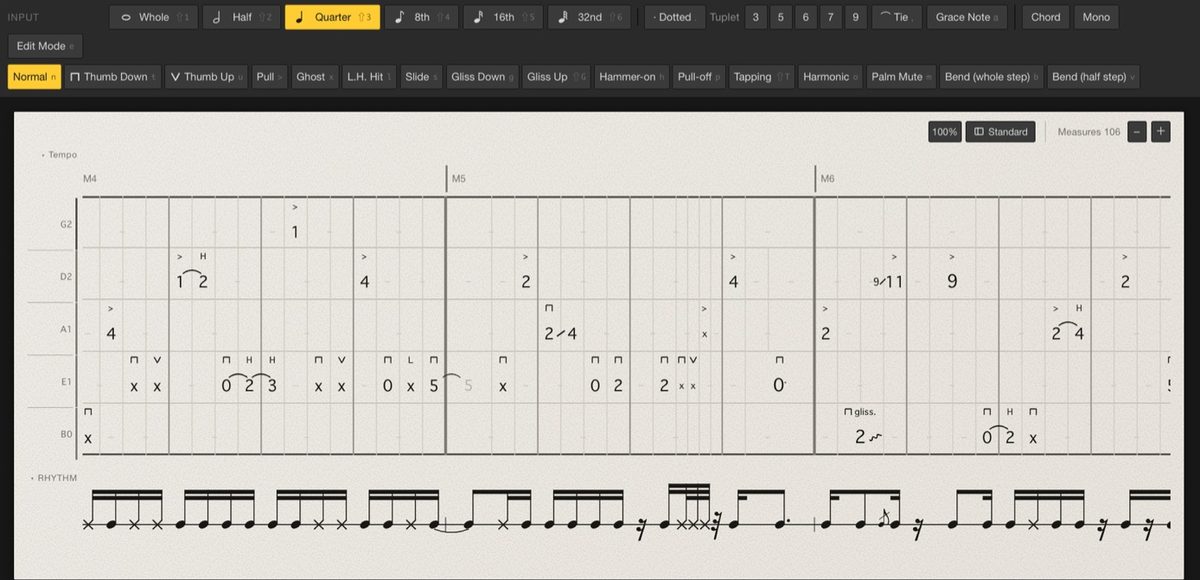
With double thumbing, the thumb hits the string on the way down and again on the way back up. A plain T can't show which is which, so some tabs borrow the down-stroke and up-stroke marks used for string players and pick players: ⊓ for down and V for up. That's how Lowline writes them too.
Left-hand hits
A left-hand hit (a percussive slap with the fretting hand) has no standard symbol. You'll see L, LH or L.H. above a muted note. Lowline marks it with an L.
04
Ghost note or dead note? Two conventions
This is where tabs disagree the most. “Ghost note” gets used for two different sounds:
| Written as | What you play | Usually called |
|---|---|---|
x | Mute the string with your fretting hand and pluck it. A click, no pitch | Dead note, muted note, and often ghost note |
(5) | Fret the note and play it very softly. You can hear the pitch, barely | Ghost note |
In funk and slap playing, “ghost note” usually means the muted click, so most bass tab you'll find writes ghost notes as x. Lowline does too. If a tab uses both x and parentheses, the parentheses are the soft, pitched notes.
When in doubt, check the tab's legend, or listen to the recording: if you can hear a pitch, it's a soft note, not a click.
05
The one thing plain tab doesn't tell you: rhythm
Plain-text tab shows which notes to play and where, but not when. The spacing between numbers is only a rough hint, and different people space their tabs differently. These two lines have the same notes, spaced differently. Is the rhythm different, or did two people just type it differently? You can't tell.
E|-3---3-3---5---|
E|-3-3-3-----5---|
Here are two rhythms either line could mean:
That's why reading plain tab almost always means listening to the recording too. Tab that shows rhythm fixes this:
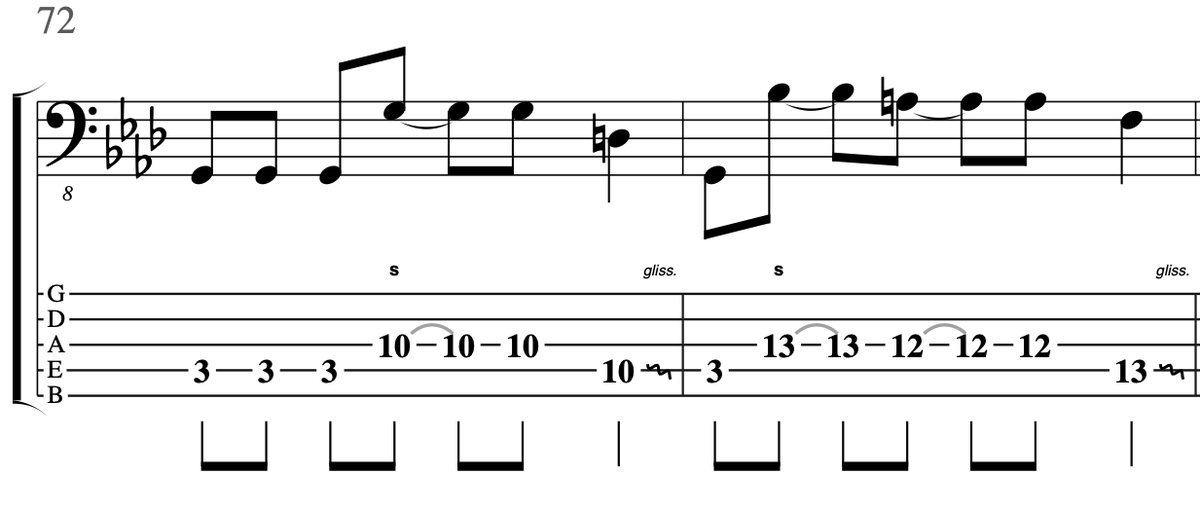
- Rhythm tab adds stems and beams to the fret numbers, like standard notation
- A rhythm staff under the tab shows just the note lengths
- Standard notation above the tab shows both pitch and rhythm
Guitar Pro and Lowline both do this for you. In Lowline, the rhythm notation under the tab draws itself as you type, and the PDF export adds stems and beams under the tab numbers, with standard notation above if you want it.
If you're writing tab for other people
- Put the tuning and the number of strings at the start
- Write the tempo and time signature
- Show the rhythm, or at least link the recording
- Add a short legend for any symbol that could be read two ways (x, T, P)
FAQ
FAQ
- Is the top line of bass tab the thickest string?
- No. The top line is the highest-pitched string (G on a 4-string), and the bottom line is the lowest (E, or B on a 5-string).
- What does x mean in bass tab?
- Usually a dead (muted) note: a percussive click with no pitch. Many bass tabs also call this a ghost note.
- What's the difference between p and P?
- A lowercase p between two numbers (
7p5) is a pull-off. A capital P above a note, in slap tab, is a pop. - What does a number in parentheses mean?
- Usually a ghost note: a real note played very softly. Some tabs also use parentheses for a note that's still ringing from before.
- How is bass tab different from guitar tab?
- It's the same system with fewer lines: four for a standard bass (E A D G, bottom to top) instead of six. Slap marks (T, P) are the main bass-specific addition.
Writing your own bass tab
Lowline is the tab editor I built for writing bass: a key for each technique (slap, pop, ghost notes, slides, hammer-ons, harmonics and more), rhythm notation that draws itself, and playback recorded from a real bass (fingerstyle, slap, ghost notes and harmonics, in a Clean or distorted tone). It runs on Mac and Windows and costs ¥2,980 (before tax, about US$20), one-time.
More from this blog: How to check your bass timing · Bass tab from audio · How to make a scrolling bass tab video · A Guitar Pro alternative for bass