Blog
How to check your bass timing
And see exactly where you rush or drag, in milliseconds
- Why listening back to yourself only gets you halfway
- How to measure your timing note by note with Tightline, a free browser tool
- How to read the results and turn them into a practice plan
"Record yourself to a click and listen back." It's the standard advice for tightening up your timing, and it's good advice. But listening back mostly tells you that something is off. It doesn't tell you which notes, or by how much.
So I built a tool that does the measuring: Tightline. You play along with a tab, and it scores your take on timing, pitch, note length and evenness, down to "12 ms late" on every note. It runs in your browser, it's free, and there's no sign-up.
Here's how to use it, and how to turn the numbers into something you can practice.
01
Why your ears aren't enough
Timing problems on bass are small. Here's how long a single sixteenth note lasts:
| Tempo | One 16th note |
|---|---|
| 90 BPM | about 167 ms |
| 120 BPM | 125 ms |
| 150 BPM | 100 ms |
In Tightline, a note counts as dead-on (PERFECT) when it lands within 20 ms of where it should. At 120 BPM, that's less than a sixth of a sixteenth note. You can feel when a take is pushing ahead, but hearing whether it's 15 ms or 35 ms, and on which notes, is a different story.
The DAW way
You can check this yourself: record to a click in your DAW, zoom in, and compare each note's attack to the grid. It works, but going note by note through eight bars gets old fast. Tightline does that comparison for you, on every note, every take.
02
What Tightline scores
Every take gets a score out of 100, built from four parts:
| Part | What it checks | Weight |
|---|---|---|
| Pitch | Whether you played the notes in the tab. Catches wrong and missed notes | 40% |
| Timing | How far each note lands from where it should | 35% |
| Note Length | Whether you stop notes on the rests | 15% |
| Evenness | How consistent your volume is from note to note | 10% |
Notes that aren't in the tab cost 1.5 points each (up to 10). Each note also gets a rhythm-game style judgment:
| Judgment | Off by |
|---|---|
| PERFECT | 20 ms or less (and the right pitch) |
| GREAT | 40 ms or less |
| GOOD | 80 ms or less |
| MISS | more than 80 ms, a wrong note, or not played |
Scores get a rank: SS from 98, S from 93, A from 85, and a B at 70 counts as a clear.
What you can play
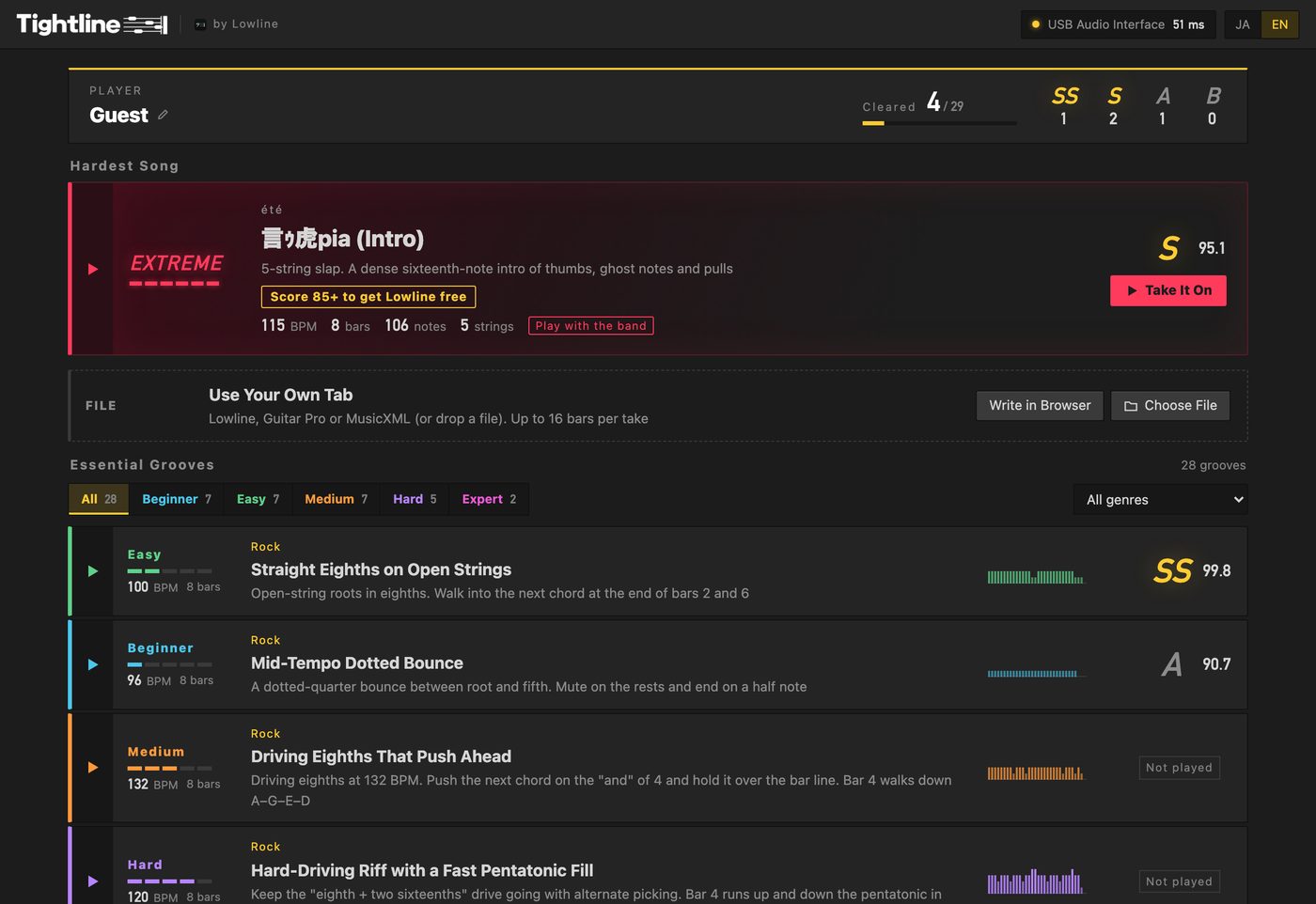
- 28 Essential Grooves across 14 styles: rock, pop, Motown, funk, slap, blues shuffles, walking bass, reggae, bossa nova, metal and more. Five levels, from Beginner to Expert
- The Hardest Song: the intro of "言ゥ虎pia" by my band été, a five-string slap part. Score 85 or higher and I'll send you Lowline for free (more in section 5)
- Your own tab: open a Lowline, Guitar Pro or MusicXML file and get scored on any song, up to 16 bars per take. No file? Write one in the browser
03
How to use it
1. Plug in
Open Tightline in Chrome, Edge or Safari on your computer, press Use Mic / Interface, and allow microphone access.
- An audio interface works best. Your bass goes straight in, with nothing else in the signal
- Your computer's mic works too. Wear headphones so the click and drums don't end up in your recording
- Bluetooth earbuds won't work. Their delay changes every time, so timing can't be measured
- Play clean, without effects
2. Run the latency test
Your interface and computer delay the sound slightly. If Tightline doesn't know by how much, a perfectly timed note shows up as late. So the first time, press Run the Latency Test and play an open string in 8th notes, 16 times, along with the click and drums. That delay gets subtracted from every take after that.

The number drifts a few ms between runs. That doesn't matter, since anything within 20 ms scores full timing points. If you want to be sure, press Check It and play the test once more. Run the test again whenever you change your interface or buffer size.
3. Pick a song and hit REC
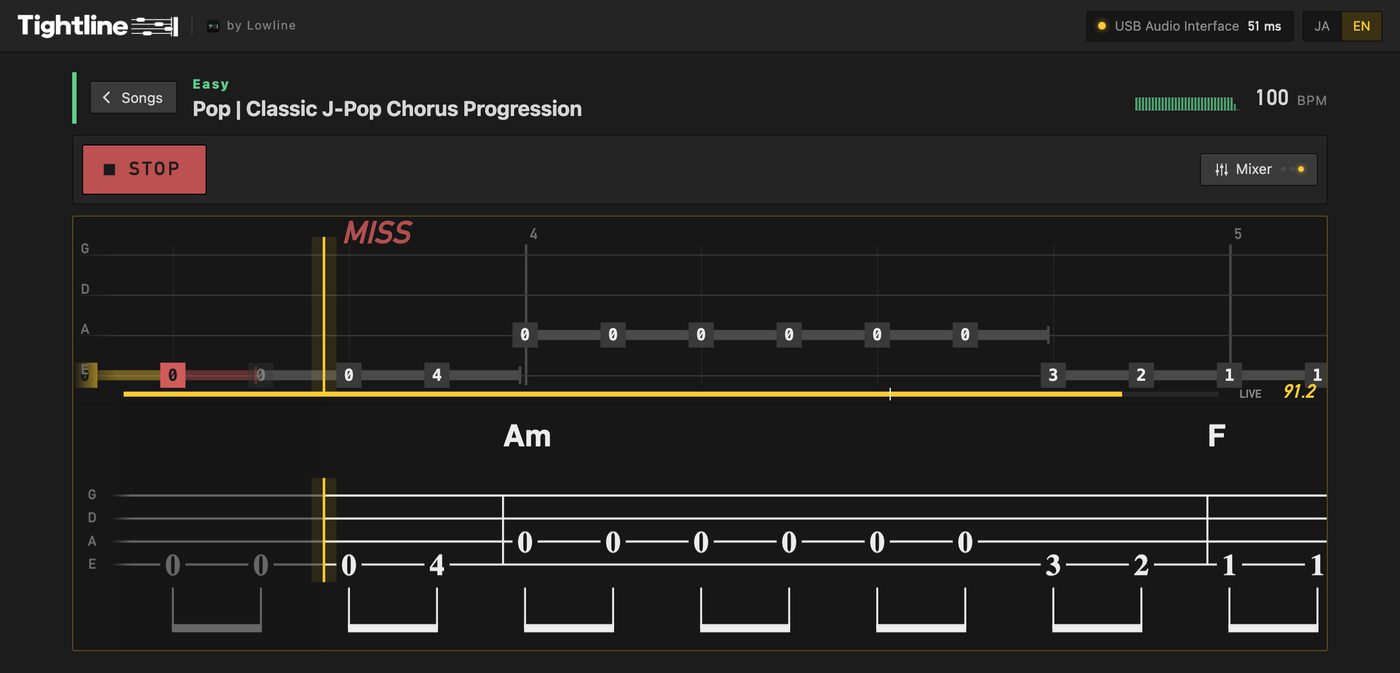
Press REC (or the space bar). After a one-bar count-in, the tab scrolls in from the right. Play each note as it crosses the yellow line. When you reach the end, scoring starts on its own.
Before you play, you can set:
| Setting | What it does |
|---|---|
| Bars | Which bars to play, for drilling just the hard part |
| Speed | 50–100%. Slowing down doesn't change the pitch |
| Listen | Hear the part played exactly as written first |
| Mixer | Click, drums and guide volumes. The drums follow the bass line, kick and all |
| View | Tab or standard notation underneath, zoom from 75 to 200% |
A take counts as a personal best when you play every bar at full speed.
04
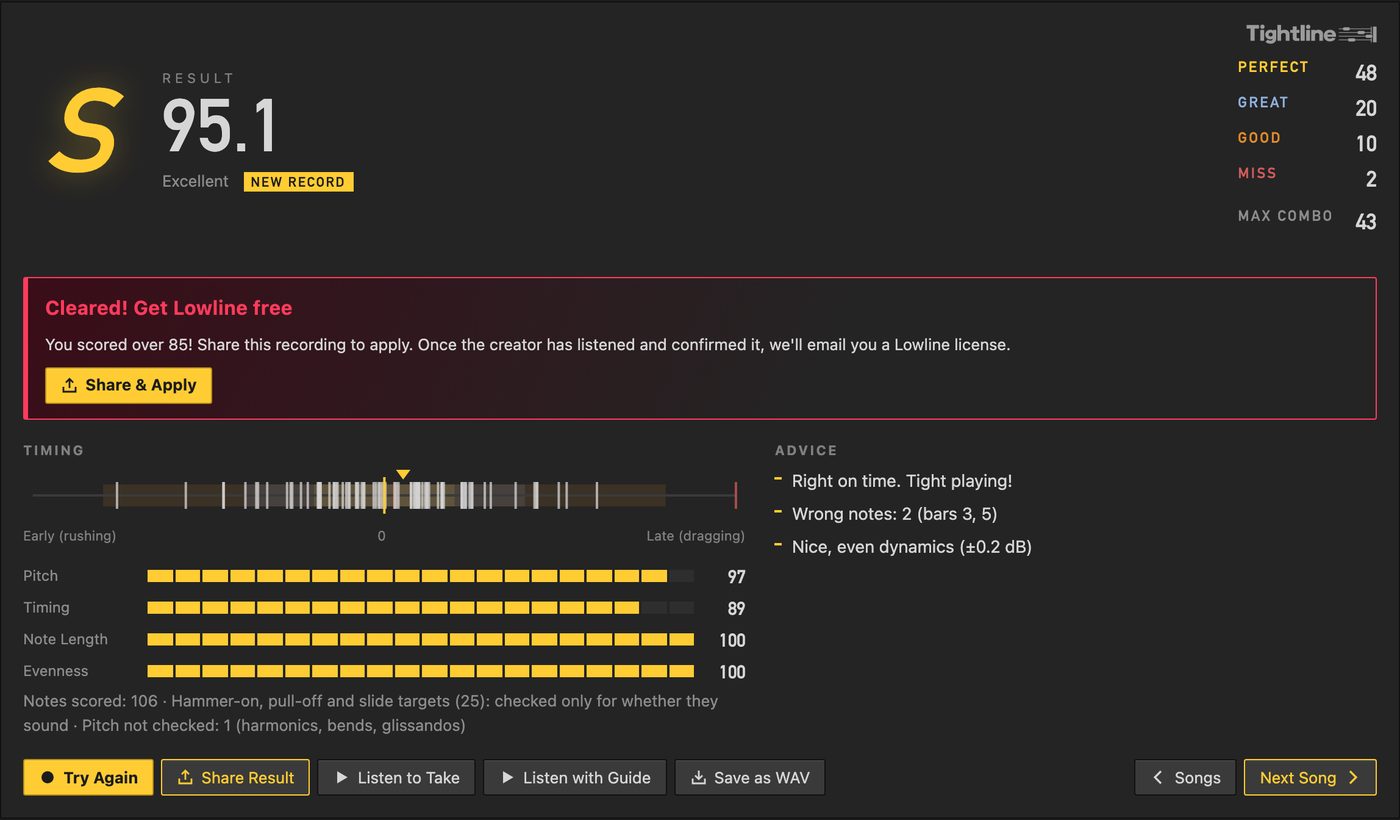
Reading your results
Timing: are you a rusher or a dragger?
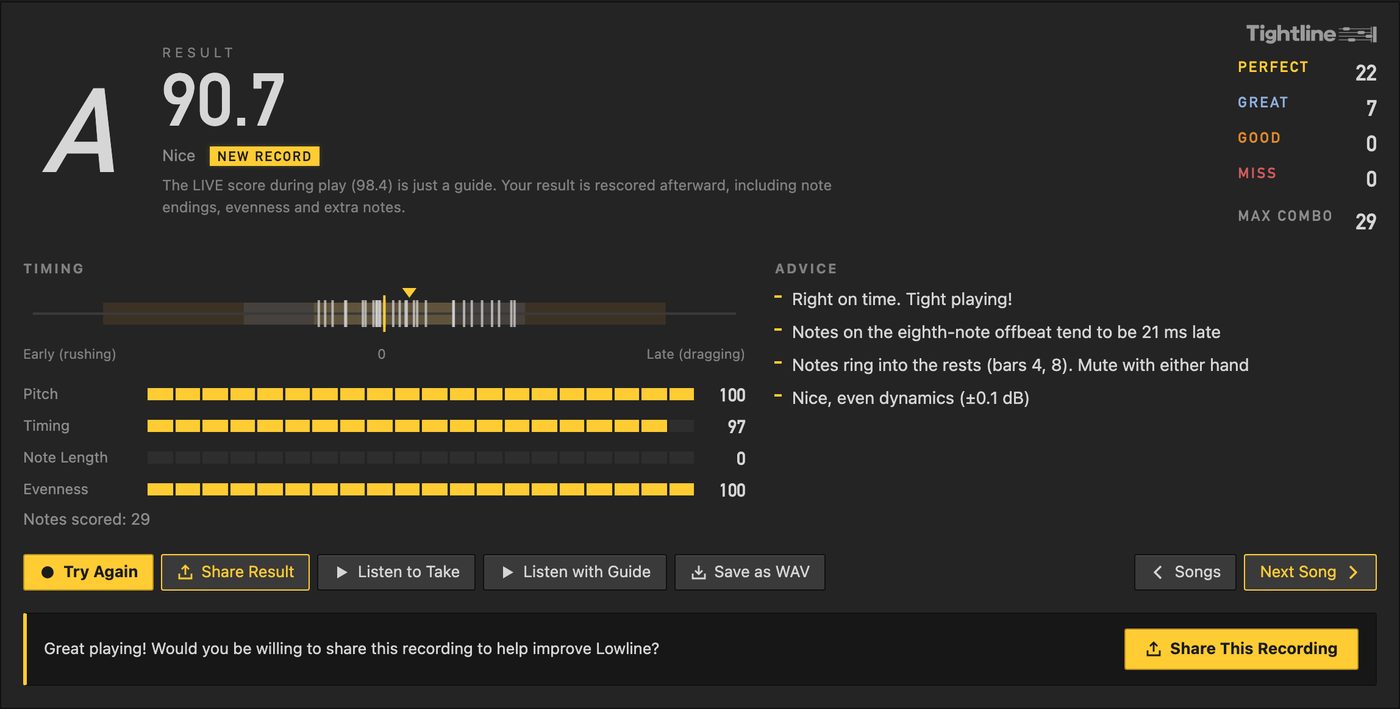
The strip on the left plots every note as a line. Left of 0 means early (rushing), right means late (dragging). If the lines lean to one side, that's your habit.
Advice: where in the beat you slip
This is the most useful part. Beyond "you're dragging overall," it tells you which part of the beat you drift on: the downbeat, the eighth-note offbeat, the sixteenth-note offbeat, or triplets. "Notes on the eighth-note offbeat tend to be 21 ms late" means your downbeats are fine and the "ands" are behind.
It also lists wrong or missed notes by bar, bars where notes ring into the rests, and how even your dynamics are (±dB).
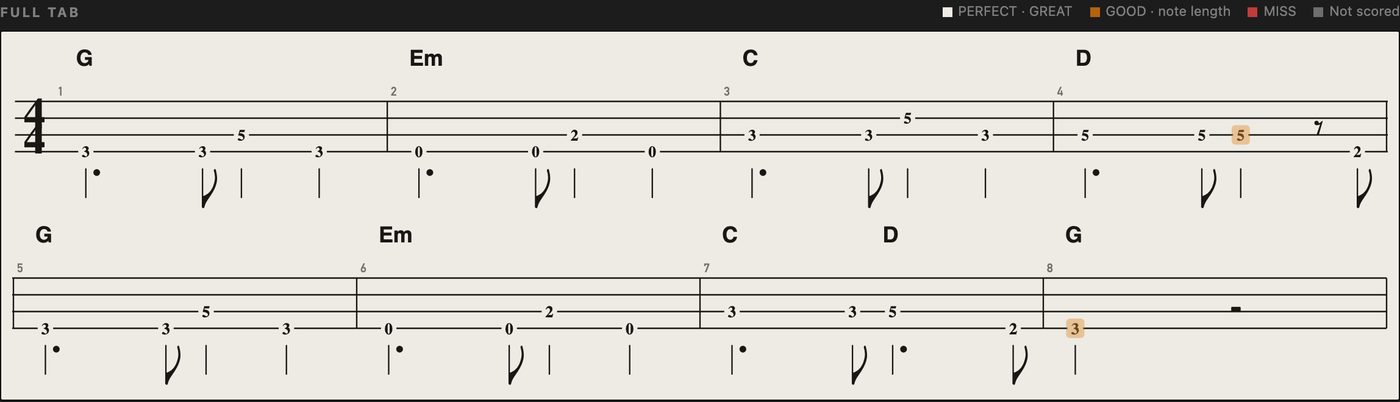
Full Tab: which notes
Below the result, every note in the tab is colored by its judgment. Click a note to see the detail, like "12 ms late · pitch OK".
Turning it into practice
- Pick the biggest problem from the advice: one beat position you drift on, or the bars that ring over the rests
- Press Practice Weak Bars. It sets up your lowest-scoring bars at 75% speed
- Play them a few times, thinking about that one thing only
- Go back to full speed and run the whole thing
Listen to Take and Listen with Guide let you hear what the numbers mean. Using both, the numbers and your ears, is how the feel starts to stick.
A 100 is really hard
When I score my own real takes, played as written (40 sections, mostly songs from my band), they average about 91. Even Lowline's own playback, with perfect timing, scores about 98. If you're in the 80s, you're playing it well.
I test the scoring, too. With 1 in 10 notes in the tab moved by one or two frets, it flags 84% of those notes as wrong, and wrongly flags 3.5% of the correct ones. It has blind spots: it can't always tell when you played an octave too low, and on hammer-ons and slides it only checks that the target note sounded, not its exact pitch.
05
The Hardest Song
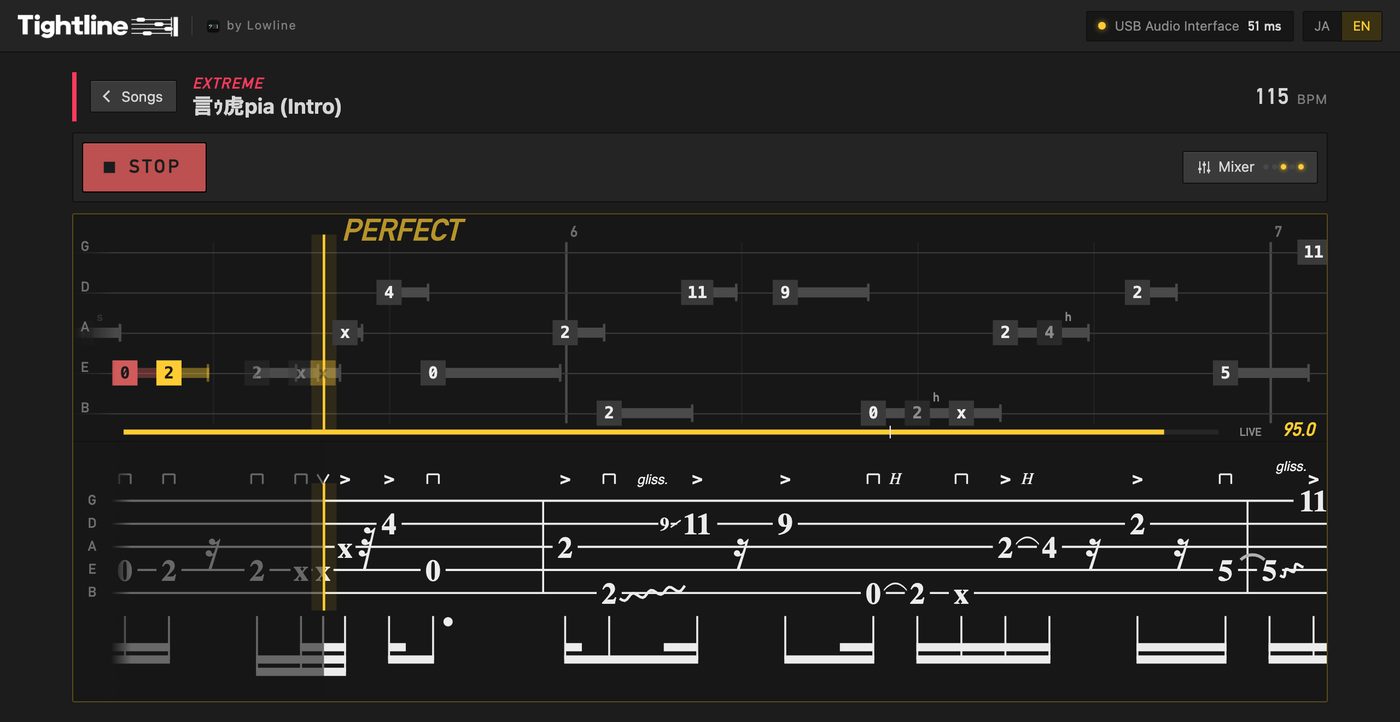
At the top of the home screen sits the Hardest Song: the intro of "言ゥ虎pia" by my band été. Eight bars of five-string slap at 115 BPM, 106 notes of thumbs, ghost notes and pulls packed into sixteenths. You can play it along with the band's real drums and guitars.
Score 85 or higher and you get Lowline for free. Press Share & Apply on the result and send the recording with your email. Once I've listened and confirmed it's really you playing, I'll email you a Lowline license. There's no deadline and no limit on how many people can get one (though I may end it without notice). Already own Lowline? You can give it to a friend.
Leaderboards and sharing
The Essential Grooves and the Hardest Song have leaderboards. Pick a nickname, press Join, and your personal bests go up. Only your nickname and score are sent. I'm on there too, as "Naoto(été)". Come beat me.
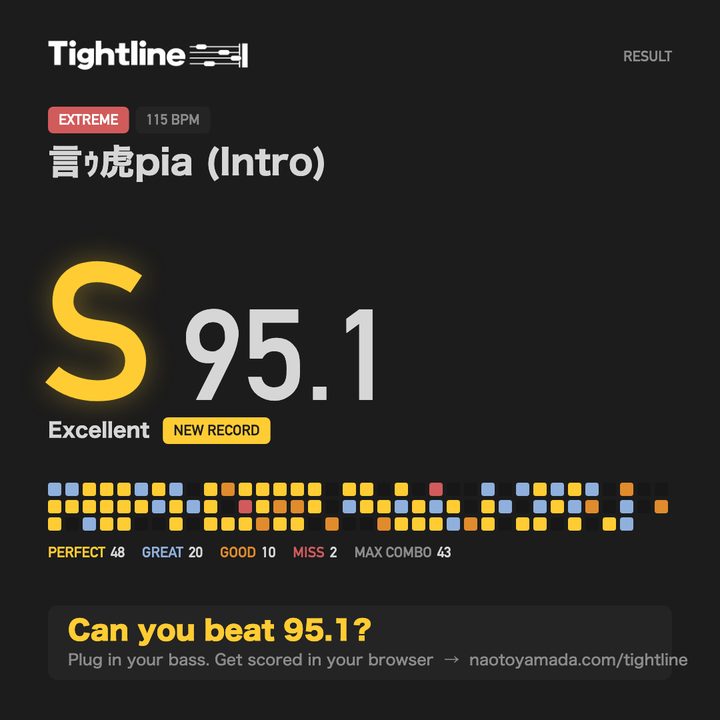
Share Result turns your take into an image: your score, rank, and a grid with one square per note in its judgment color. Post it and ask your friends what they can get.
FAQ
FAQ
- Is it really free? Do I need an account?
- Free, and no account. Open the page and play.
- Where do my recordings go?
- Nowhere. Recording and scoring both happen inside your browser. If you join a leaderboard, your nickname and score are sent, and that's it. A recording is only sent if you choose to: with Share This Recording (offered on scores of 90+, to help improve Lowline's audio-to-tab feature) or when you apply for the Hardest Song offer.
- Does it work on a phone?
- It opens in a phone browser, but the tab gets small. A computer is much easier to play along with.
- It says every note is late by the same amount
- That's a latency problem, not you. Run the latency test again. Bluetooth earbuds won't work.
- Can I use a five-string bass?
- Yes. The Hardest Song is written for five strings, and your own tab is scored with however many strings it has. The Essential Grooves are written for four.
- I play with a pick, or slap
- Set Technique in Settings to Fingers, Pick or Slap. It changes how Tightline listens for the start of each note.
- What happens if I feed it the guide playback?
- It notices. You get "Too tight to be true," and the take doesn't count. If you really played it by hand, congratulations, you're a human metronome.
Why I built it
Karaoke machines score your singing. I wanted the same thing for bass: play, get a number, try to beat it. It turns out that makes practicing a lot more fun.
Under the hood it uses the audio analysis from Lowline, the bass tab editor I make. If you write your own songs' tabs in Lowline, you can open them in Tightline and get scored on your own music.
Play a song and let me know your score 🕺
More from this blog: Bass tab symbols explained · Bass tab from audio · How to make a scrolling bass tab video · A Guitar Pro alternative for bass