Blog
Bass tab from audio: what automatic transcription can and can't do
An honest look from the bassist who built one
- Why turning a recording into bass tab is harder than it looks
- The mistakes software makes, and how to spot them
- How to record and set things up for the best draft, then fix it fast
“Turn any song into bass tab” is a promise you'll see a lot these days. It's a great idea. Writing out a bassline by ear takes time, and most of that time goes into the boring part: typing in notes you can already hear.
I built a feature like this into Lowline, my bass tab editor, so I've spent a lot of time with recordings that didn't come out the way I hoped. Full disclosure: Lowline is my app. But this post is mostly about what any of these tools can and can't do, so you know what to expect before you pay for one.
01
The short answer
Software can give you a draft, not a finished tab. A good draft saves you most of the typing. You still need your ears to finish it.
| What you feed it | What to expect |
|---|---|
| A clean recording of just the bass (DI, no effects) | The best case. Most notes land in the right place |
| A bass stem separated from a full mix | Usable, but leftover sounds from the other instruments cause extra or missing notes |
| The full song (an MP3 or a YouTube video) | The hardest case. The kick drum, guitars and keys all share the bass's range |
| Distortion, fuzz or an octaver | Hard. The extra harmonics confuse the pitch |
Even in the best case, expect to fix things. On the 11 real bass recordings I use for testing, Lowline 1.0.5 scores about 77% on pitch accuracy (the version before it scored 57%). So plan on fixing roughly one note in four or five, and always check the result by ear.
02
Why bass is harder than it looks
You'd think bass would be easy. It's mostly one note at a time, and it's often the clearest thing in a mix. But software has to answer three questions for every note, and bass makes each one tricky.
1. Which pitch? (the octave problem)
The low E on a 4-string vibrates at about 41 Hz, and the low B on a 5-string at about 31 Hz. Down there, much of what you actually hear is the note's overtones, not the fundamental. Software that follows the strongest frequency can land exactly one octave too high. It's the most common pitch mistake, and it's easy to miss when you look at the tab, because the fret number looks perfectly reasonable.
2. Which string? (the fingering problem)
A recording tells you the pitch, but not where it was played. On a 4-string bass, the note of the open G string can be played in four places:
G|--0--------------|
D|-----5-----------|
A|--------10-------|
E|------------15---|
All four sound the same pitch (with slightly different tones). The software has to guess the fingering from the notes around it, and its guess may not be the one a player would choose. A line played high up the neck on the E string can come out spread across all four strings.
3. Which rhythm? (the timing problem)
Real players don't play exactly on the grid, and that feel is part of what makes a groove. But the software has to decide whether a note that's a little late is a 16th note, a triplet, or just a laid-back 8th. If it doesn't know the tempo and time signature, it can't decide well, and you get busy rhythms that nobody played.
03
Two kinds of tools
| Full-song services | Bass-only, inside a tab editor | |
|---|---|---|
| Examples | Web services such as Klangio and Songscription | Lowline |
| What you give it | Any song | A recording of just the bass (WAV) |
| Good at | Getting a rough idea of a song you don't have the parts for | Turning your own playing into tab you can keep editing |
| Watch out for | Results vary a lot from song to song | Doesn't pull the bass out of a full mix |
If you want to learn a part from a record, a full-song service is the quicker start. If you're writing out your own lines (for your band, your students, or a playthrough video), recording the bass on its own gives you a much better draft, and that's the case Lowline is built for.
04
How to get the best draft
These tips come from Lowline, but most of them help with any transcription tool.
- Record DI, with no effects. A clean signal straight from the bass gives the clearest pitch. Leave the distortion, fuzz and octaver for the take you publish
- Use the bass on its own. Your own DI track is better than a stem separated from a mix
- Tell it the tempo and time signature first. Otherwise notes land in the wrong places on the grid
- Tell it what not to expect. If the part has no 16th notes or triplets, say so, and small timing wobbles won't turn into busier rhythms
- Export as WAV. Lowline only loads WAV files, and uncompressed audio is a safer start for any tool
In Lowline, step by step
- Drag your WAV onto the window (or use Load audio under Backing track in the sidebar) and choose Bass-only stem — transcribe it
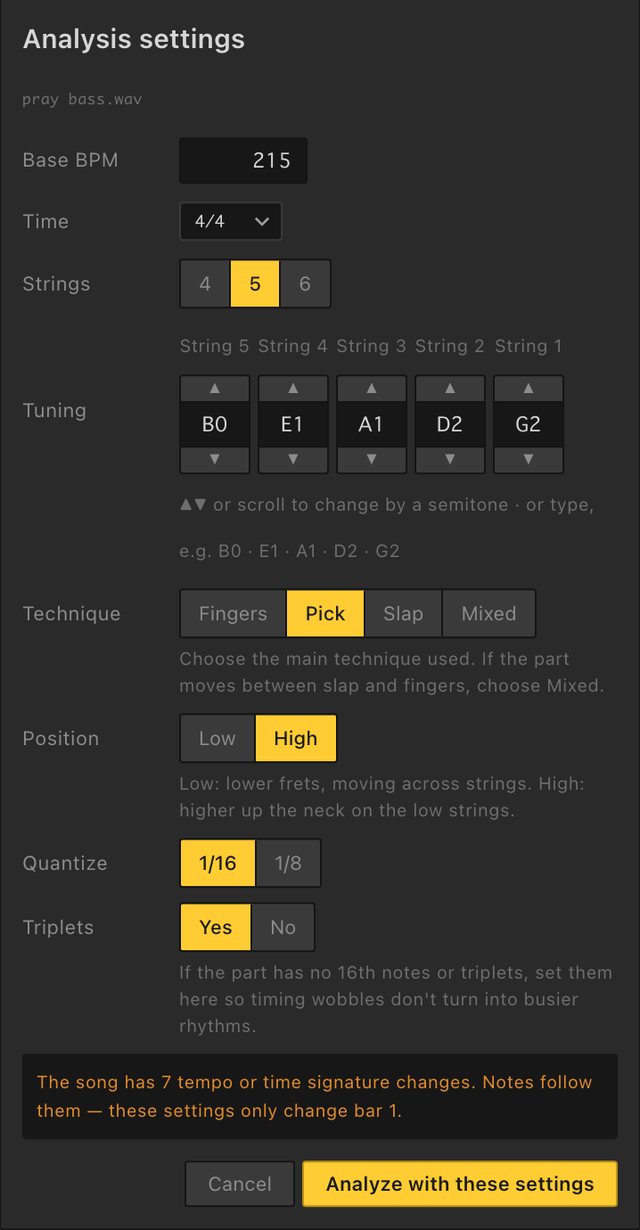
- In Analysis settings, set the BPM, time signature, number of strings (4, 5 or 6) and tuning to match the recording
- Choose the Technique (Fingers, Pick, Slap or Mixed) and the Position: Low for lower frets moving across strings, High for higher up the neck on the low strings
- Under Quantize and Triplets, turn off what the part doesn't use, then click Analyze with these settings
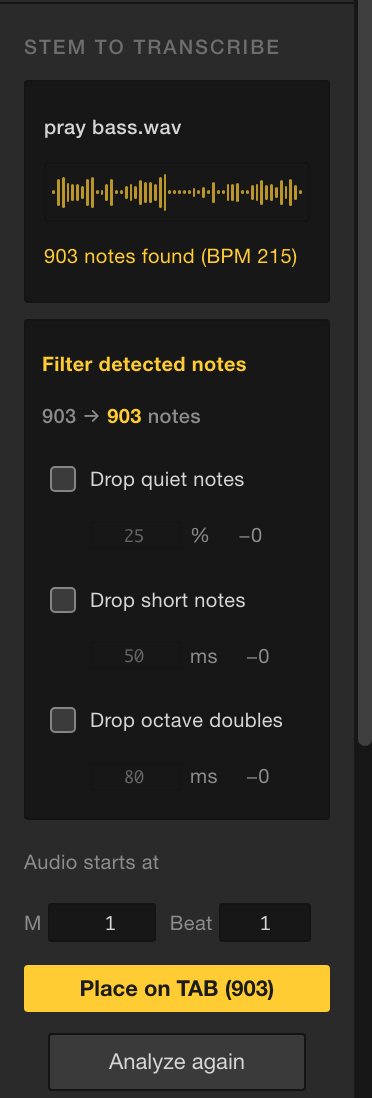
- When it's done, check Filter detected notes in the sidebar and set Audio starts at if the recording doesn't start at bar 1. Then click Place on TAB
The Position setting is there because of the fingering problem above. It's how you tell Lowline which of those four G's you meant.
Filter detected notes
After the analysis, the sidebar shows how many notes were found and three filters you can switch on before placing them:
- Drop quiet notes: removes notes below a volume you set, like string noise and bleed
- Drop short notes: removes notes shorter than a length you set
- Drop octave doubles: removes a note that shows up an octave away from another at almost the same moment. This is the octave problem from above
05
Fixing the draft quickly
Here's a real example from my band's song “pray”: the same two bars, straight out of the analysis and after I fixed them.
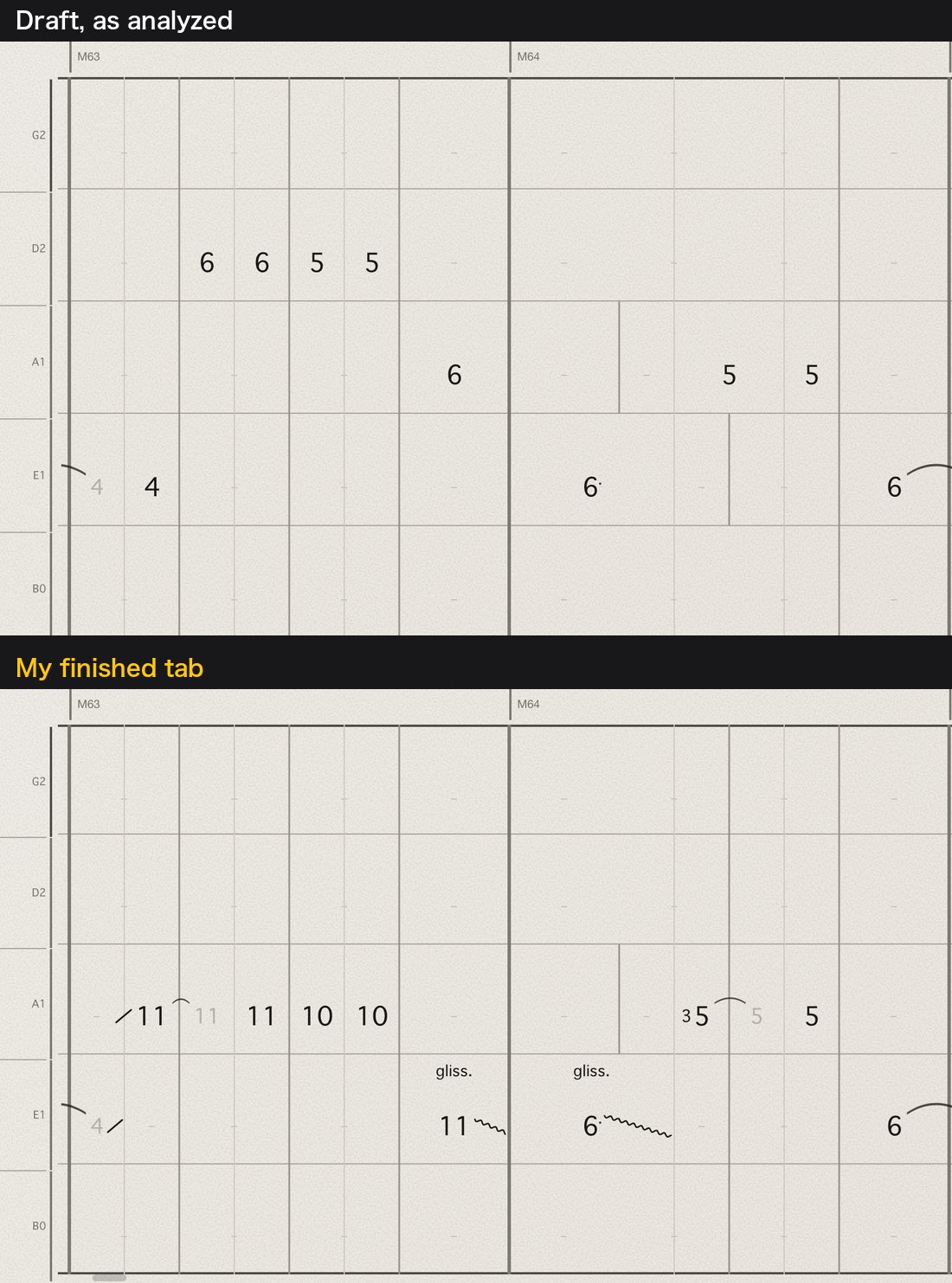
Almost every pitch in the draft is right. What changed is where they're played: the draft keeps them low on the neck, on the D and A strings, while I play this part higher up on the A and E strings, with a slide, a grace note and glisses that the analysis didn't add. That's the fingering problem from earlier. The Position setting helps, but expect to move some notes yourself.
Fixing a draft goes much faster when you know what kinds of mistakes to look for. Here's my order:
- Play it against the recording. Load the same WAV as a backing track (Load audio → Song / backing track), line up bar 1 in the audio editor, and play both together. The levels are matched automatically, so you hear the tab and the recording side by side
- Loop the bars that sound wrong. Select the bars and press C to loop them
- Check octaves first. If a note sounds right but too high or too low, it's an octave off. Press ⌥↑ / ⌥↓ (Alt on Windows) to move it up or down an octave
- Then fix the fingering. If a note is on a string you wouldn't use, press ⇧↑ / ⇧↓ to move it to another string at the same pitch
- Finally, the rhythm. Clean up note lengths, and add slides, ghost notes and other techniques by ear
FAQ
FAQ
- Can Lowline make bass tab from a YouTube video or an MP3?
- No. Lowline loads WAV files, and it can't pull the bass out of a full mix. It works from a recording of just the bass.
- Which basses can it transcribe?
- 4-, 5- and 6-string basses, in any tuning you set. The editor itself handles 4 to 7 strings.
- Does it handle slap?
- Yes. Choose Slap under Technique (or Mixed, if the part moves between slap and fingers). Ghost notes and some glisses get marked for you. Thumb and pop marks you add yourself.
- Does it work offline?
- Yes. The analysis runs on your computer, and your recording isn't uploaded anywhere.
Try it with your own recording
Lowline is a tab editor for Mac and Windows, made only for bass. It's ¥2,980 (before tax, about US$20), one-time, with a full refund within 30 days if it doesn't work for you.
In the browser demo you can write up to 16 bars of tab and hear it with the real tones. The audio analysis is in the full version.
Once your tab is done, you can turn it into a scrolling video for your playthrough: How to make a scrolling bass tab video.